
4 Types of Healthcare Panic Button Systems (And How to Choose the Right One)
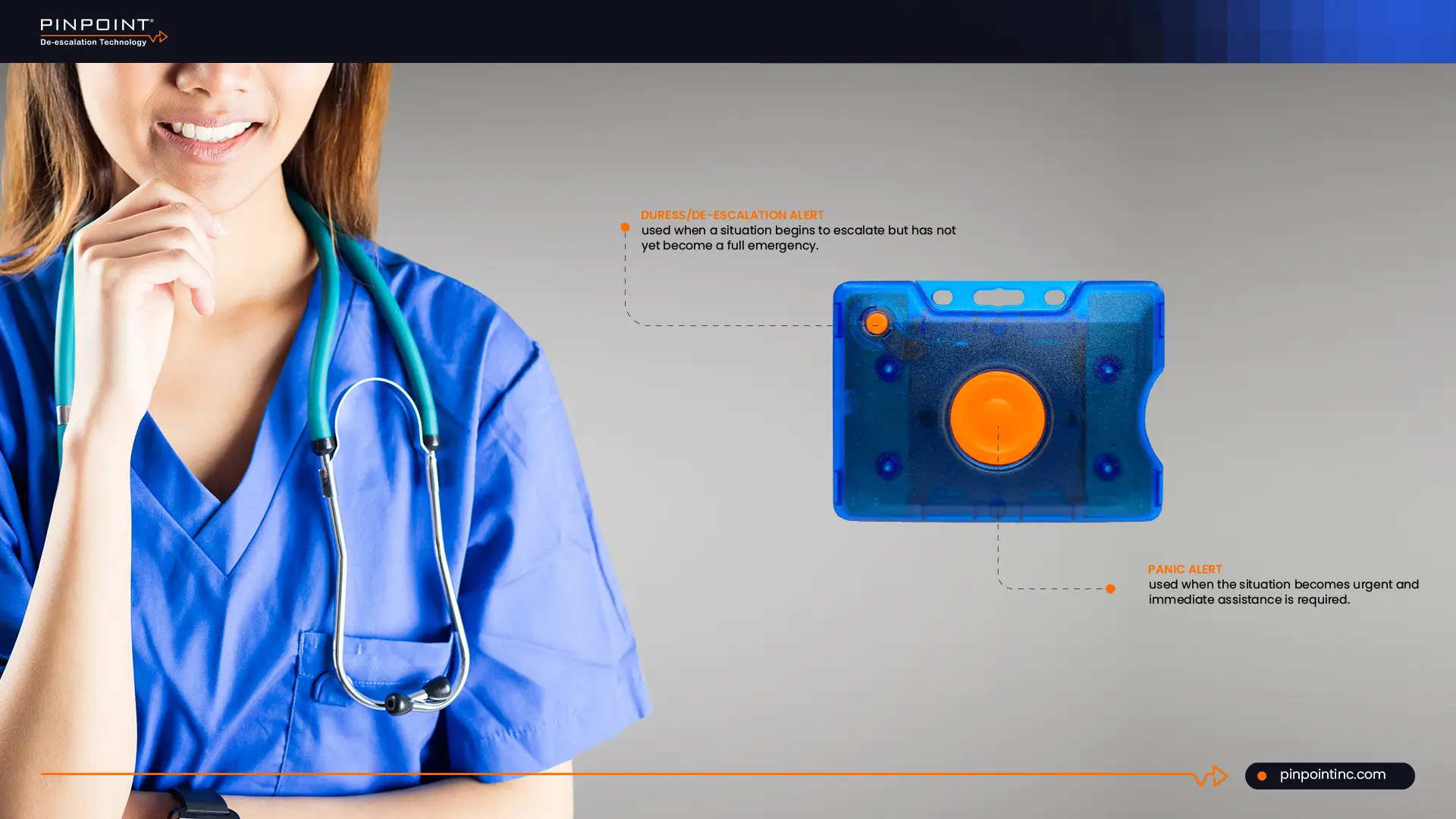
Healthcare workers deal with unpredictable situations every day, especially in hospitals where patient behavior can change quickly and without warning. In those moments, the biggest concern is not just safety, it is how quickly help can arrive.
This is where a healthcare panic button system actually helps.
Instead of relying on verbal calls or delayed communication, staff can trigger an alert instantly and notify the right team without leaving their position. That sounds simple, but not every system actually works the same way.
Some panic device systems are fixed in one location, some are wearable, and others are connected to broader systems. The differences between them directly impact how fast a response happens and how well staff are protected.
If you are trying to understand which option makes sense for your facility, this is where most guides fall short. They explain what panic buttons are, but not how to choose between them.
In this guide, you will learn the four main types of healthcare panic button systems, how they are used in healthcare environments, and how to decide which one actually fits within your setup.
Why Healthcare Need Panic Button Systems for Staff Safety
Let’s start with a number, according to the U.S. Bureau of Labor Statistics, healthcare and social assistance workers accounted for nearly three out of every four workplace violence injuries in private industry between 2021 and 2022, a staggering 72.8% of all cases. Meanwhile, a 2024 National Nurses United report found that 45.5% of nurses reported an increase in workplace violence on their units just from 2022 to 2023. What these number shows are not isolated incidents, they are patterns.
Here is the real problem with most hospital safety systems today. They assume the caregiver can walk to a wall button, pick up a phone, or grab a walkie talkie. But in an actual assault, you do not get to leave. You are pinned, cornered, or actively being hurt. That moment of having to reach for help instead of having help on you is when prevention fails and harm happens. That is why more hospitals are moving to a wearable panic button that stays on the caregiver. It works whether you are in a patient bathroom, a supply closet, or trapped against a bed.
While adding more context into this, this is not just about best practices anymore. Regulators are drawing a line. OSHA has made it clear under the General Duty Clause that failing to protect staff from known violence hazards is a citation waiting to happen. In fact, the Eleventh Circuit Court of Appeals recently upheld an OSHA citation against a psychiatric hospital that failed to protect employees from patient-on-staff violence . The Joint Commission is also raising the bar. Starting January 2026, their new National Performance Goals include a specific focus on preventing workplace violence, moving beyond passive policies to active, accountable protection . Waiting on outdated technology is becoming a liability, plain and simple.
What Is a Healthcare Panic Button System and How Does It Work
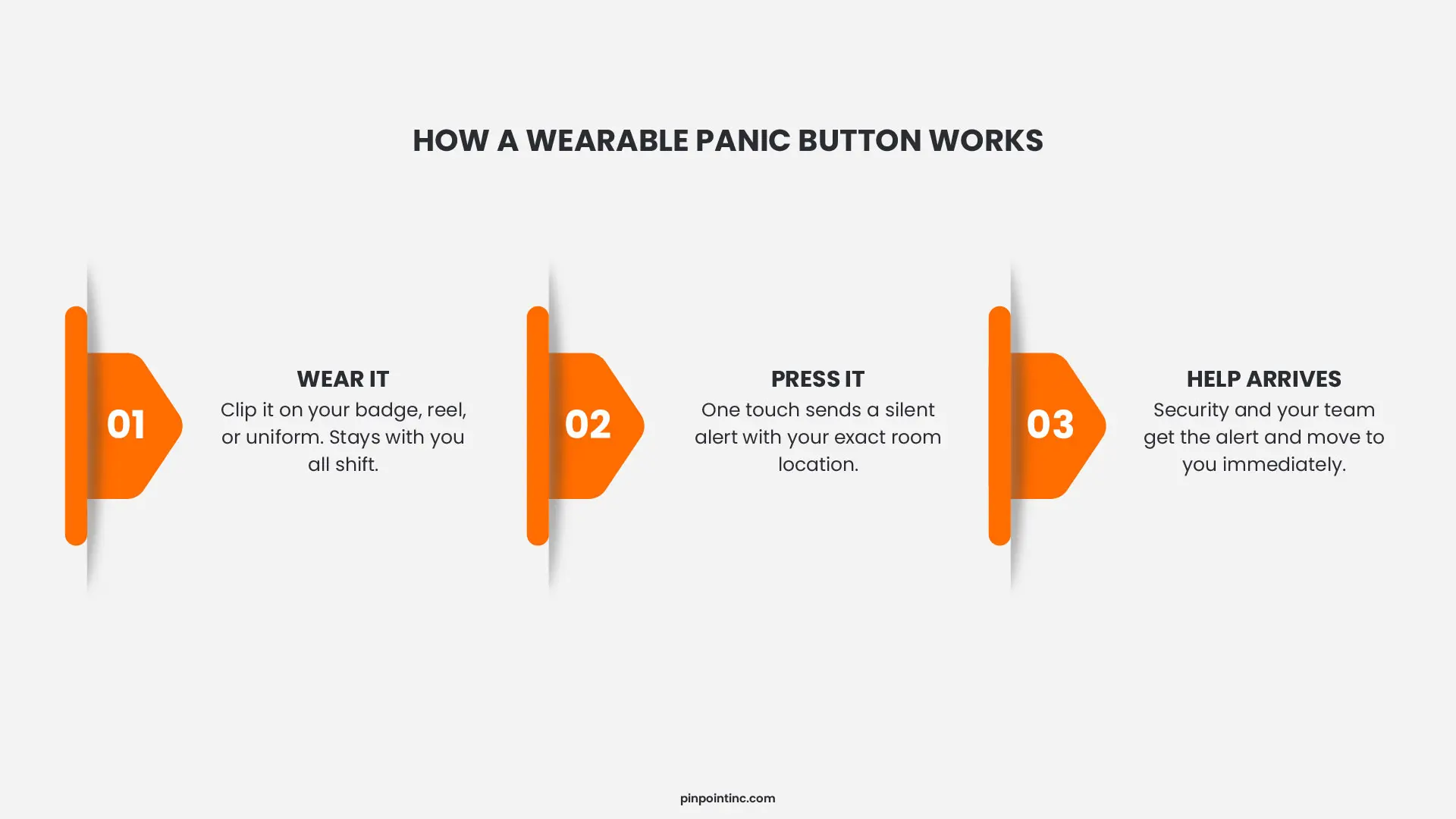
A healthcare panic button is a small wearable device, usually worn on a badge reel or clipped to a uniform, that lets hospital staff call for help the moment they feel unsafe. You press it. A silent alert goes out instantly. Security and your response team get your exact room level location. No shouting. No running to a wall station. No fumbling for a phone. Just one press and help is on the way.
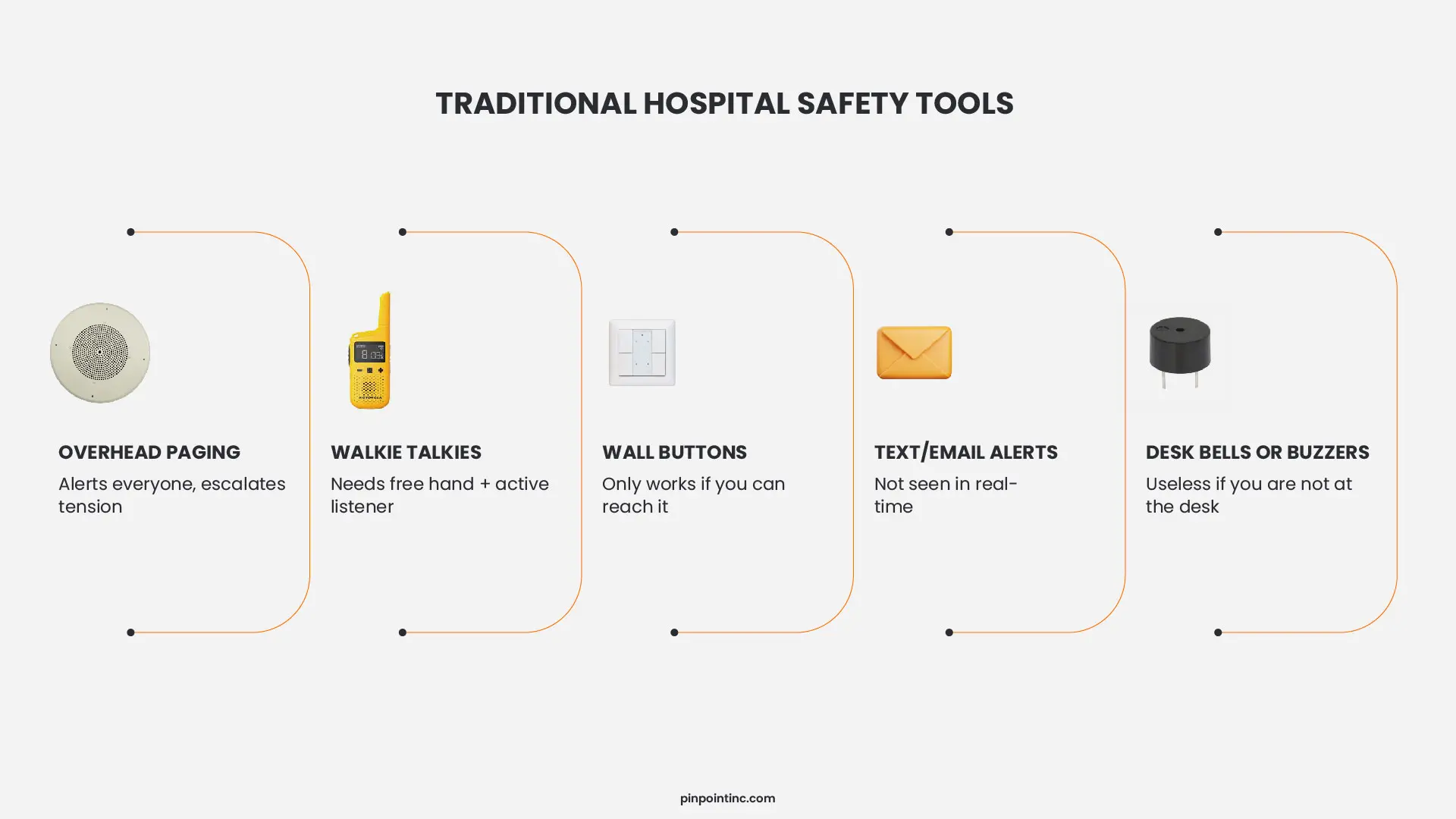
So what else do hospitals use right now? Most rely on tools that were never designed for violence. Overhead paging, which alerts the whole floor and can actually make a tense situation worse. Walkie talkies, which require a free hand, a clear channel, and someone listening on the other end. Wall mounted code buttons, which assume you can reach them when you are cornered or pinned. Mass notification texts or emails, which assume someone is watching that screen the second you need them. All of these tools work fine for equipment requests or routine calls. But none of them work when a patient has you trapped in a bathroom or pressed against a bed.
The 4 Types of Healthcare Panic Button Systems
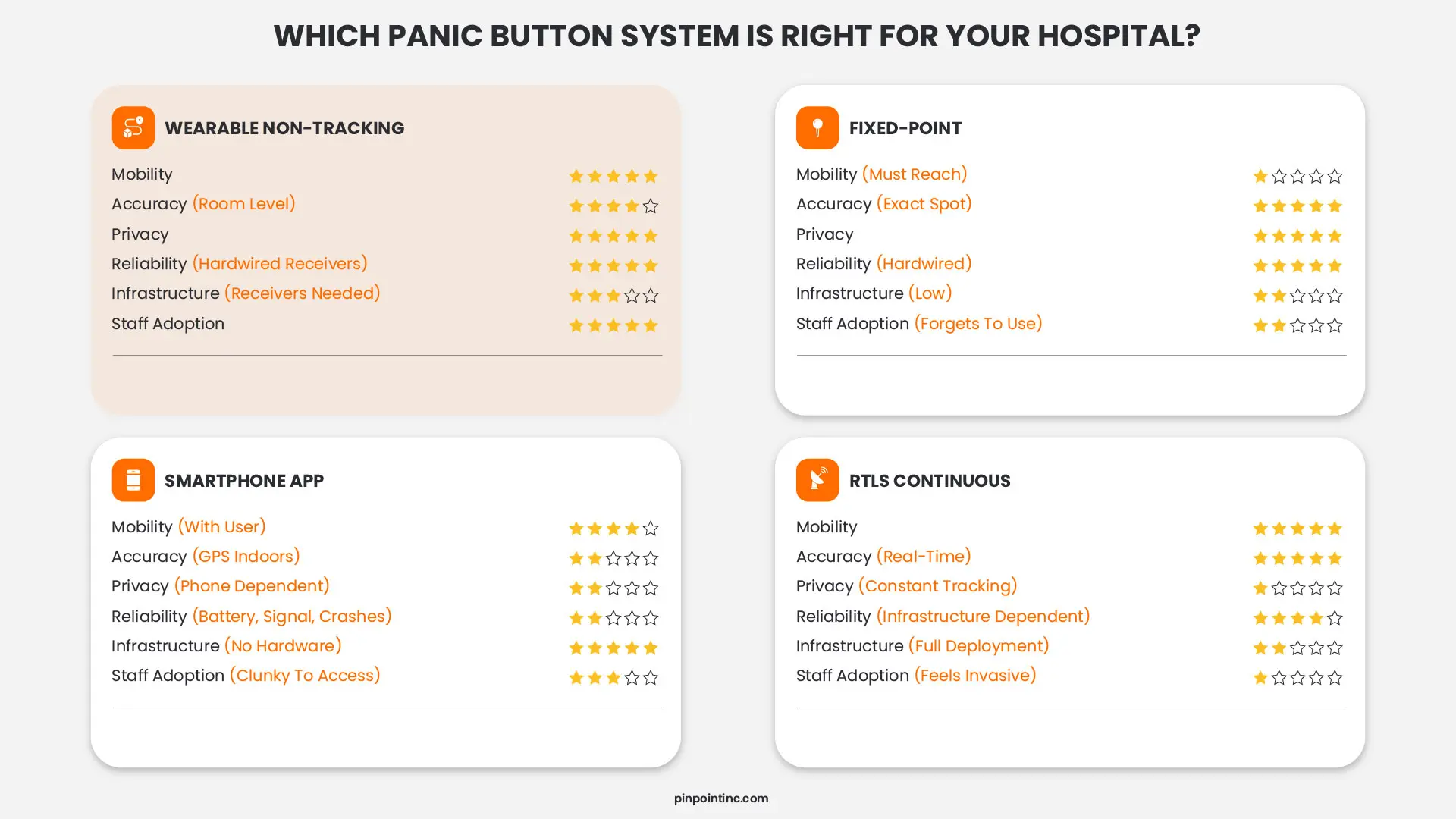
Not all panic buttons work the same way. Some live on walls. Some live on phones. Some live on your body. Each type has a place, but each also comes with trade offs. Here is what you actually need to know.
1.Wearable Non-RTLS Panic Button Systems
These are exactly what they sound like. Badges, wristbands, or clip on devices that stay with you all shift. You wear them on a lanyard, reel, or uniform. When a situation escalates, you press the button. A silent alert goes out instantly, and security gets your exact location. No running to a wall. No shouting for help.
The big advantage here is mobility. You can move anywhere, from patient rooms to supply closets to parking lots, and help can still find you. The trade off? Batteries. These devices need charging. If a badge dies mid shift, that caregiver is unprotected. Wearable systems work best for nurses, techs, and anyone who spends their day moving between rooms.
2. Fixed (Wall-Mounted) Panic Button Systems
You have seen these before. Red buttons mounted on walls in patient rooms, bathrooms, and nurses stations. They have been around for years. You walk to the button, press it, and an alarm triggers either locally on the unit or silently to security.
The upside is reliability. Hardwired buttons do not need batteries. They do not drop signals. They just sit there waiting to be pressed. The downside is obvious. You have to reach the button. In a real assault, that is not always possible. These work fine as a backup option in high risk rooms, but they should never be the only option for staff who move around.
3. Mobile/App-Based Panic Button Systems
These turn a smartphone into a panic button. Staff download an app, log in, and tap the screen to trigger an alert. Some apps use lock screen shortcuts for faster access. The alert then sends location data, usually from the phone’s GPS, to security.
On paper, this sounds great. No new hardware. Just use the phones people already carry. But here is the problem. Phones run out of battery. Screens crack. Apps crash or freeze. GPS is also less accurate indoors, often pinning someone to a general area rather than a specific room. These work fine for outpatient clinics. Not recommended for emergency departments or behavioral health units.
4. RTLS-Enabled Panic Button Systems
RTLS stands for Real Time Locating System. It knows where a person is inside a building, often down to the specific room. Unlike GPS, which struggles indoors, RTLS uses infrared or other sensors placed throughout the facility to pinpoint location with precision.
Here is what makes this different from older RTLS healthcare solutions. Some systems track staff constantly, monitoring movement, dwell time, and productivity. Apparently, this feels invasive and staff doesn’t like it. The better approach flips the model. The system only captures location when the button is pressed. No continuous tracking. No productivity monitoring. Just protection when you need it.
How to Choose the Right Panic Button Solution for Your Facility
By now you know the differences between the four main panic button options, a wearable non tracking button versus a fixed wall button or smartphone app, but knowing the types is one thing and picking the right fit for your hospital is another. Let me walk you through what actually matters when making this decision.
How hospital size and layout affect your panic button choice
A small clinic might get away with smartphone apps, but once you have multiple floors, stairwells, parking structures, and behavioral health units, you need coverage that works everywhere. Most systems create hidden problems here because RTLS tracking and app based solutions rely entirely on your hospital’s Wi Fi and network. When your network goes down for maintenance or crashes unexpectedly, those panic buttons go silent. A non RTLS wearable panic button with hardwired receivers works completely independent from your IT network, which means no Wi Fi, no cloud dependency, and no dead zones during a network outage.
Matching staff mobility needs to the right system
Do your nurses stay at a central station or walk from room to room all shift? Fixed wall buttons work fine for stationary roles, but for anyone in direct patient care, a wearable panic device is non negotiable because if a nurse cannot reach help from a supply closet, bathroom, or the far side of a patient room, the system has already failed.
Most wearable systems create a different problem because they depend on batteries, wireless signals, and constant IT oversee like firmware updates, connectivity troubleshooting, and network congestion delays. The more practical approach is a wearable badge paired with hardwired ceiling receivers, which means zero upkeep beyond charging the badge, no IT tickets, and no cybersecurity audits for every sensor.
Why response time requirements demand room level accuracy
Seconds separate de escalation from injury. Wall buttons require running to them, apps require unlocking and tapping, but a dedicated wearable triggers instantly. However, response time also depends on location accuracy because responders cannot help if they are guessing which room you are in. Does your system send a general alert like “third floor east wing” or room level precision like “Room 412, Bed B”?
RTLS healthcare systems claim superiority here because they offer real time continuous tracking with high precision, but that precision comes at a cost including constant staff surveillance, massive IT infrastructure, and a cybersecurity risk since every tracking sensor on your network is a potential entry point. A panic button hospital solution with room level accuracy only when pressed gives you the precision you need without the surveillance or network dependency.
Explore additional guides designed to help hospitals reduce workplace violence, improve response times, and protect their staff every shift.
Integration with existing security and nurse call systems
Your new panic buttons should talk to your existing security dashboards, mass notification tools, and wireless nurse call system infrastructure because a standalone panic device that does not integrate creates more work instead of less. Ask potential vendors whether their alerts can trigger hallway lights, lock down doors, or broadcast to handheld radios because the best panic button types fit into your workflow rather than fighting against it.
But integration should not mean dependency. Some vendors require their system to live on your network, connect to your cloud, and sync with your active directory, which means the moment your network has an issue, your safety system has an issue. Network independent panic buttons integrate where it matters like alert delivery without becoming yet another thing your IT team has to manage.
Budget, long term value, and hidden IT costs
The cheapest option upfront is rarely the cheapest over time. Smartphone apps have no hardware cost but low staff adoption means zero protection. Fixed wall buttons are inexpensive to install but leave mobile staff vulnerable. RTLS continuous tracking sounds impressive until you factor in years of IT maintenance, network upgrades, security audits, and cloud subscription fees.
A healthcare panic button system with hardwired receivers costs more initially but delivers lower total cost of ownership because there are no monthly cloud fees, no IT tickets for connectivity issues, no cybersecurity audits for every sensor, and no conversations about the network being down so panic buttons are down. Plus you get higher staff adoption, better response times, and lower turnover from nurses who actually feel protected.
Improve Staff Safety with the Right Panic Button System
Here is what we have covered so far, workplace violence in healthcare is rising, delayed emergency response puts staff at risk, and traditional safety tools like wall buttons and walkie talkies were never designed for real assaults. Then, you learned about the four panic button types, how they compare on mobility, accuracy, privacy, and IT dependency, and the common mistakes hospitals make when choosing a system.
In order to conclude this, the right healthcare panic button is the one staff will actually wear and use, the one that works when the network fails, and the one that protects without tracking.
That is exactly what Pinpoint’s offer, a wearable panic button designed around everything we just discussed. Hardwired receivers so there is no Wi Fi dependency or cybersecurity risk. Room level accuracy only when pressed, so no constant staff tracking. Multi channel alerts that reach security and response teams instantly with zero IT upkeep. Seeing it in action makes the difference, so request a demo and we will walk you through exactly how it fits to your facility.
FAQ’s
What are the four types of healthcare panic button systems?
The four main types are wearable panic buttons (badges ID, wristbands), fixed wall mounted buttons, mobile app based systems, and RTLS enabled continuous tracking systems. Each has different trade offs in mobility, accuracy, privacy, and IT dependency.
What is the difference between RTLS tracking and a non-RTLS panic button?
RTLS stands for Real-Time Locating System, which continuously tracks staff location throughout their shift. A non-RTLS panic button does not track location unless it is activated, and when pressed, it sends an alert with the user’s exact room location so responders can reach them quickly.
How do I choose the right panic device for my hospital?
Start with your hospital size, how much your staff moves, how fast you need responders to arrive, and what systems you already have. Then think about IT dependency, cybersecurity risk, and staff privacy. The right panic device is the one your nurses will actually wear and use without creating headaches for your IT team.
How do healthcare panic buttons improve staff safety during emergencies?
Healthcare panic buttons allow staff to call for help immediately without leaving the situation. Instead of relying on verbal alerts or nearby systems, a single press sends an instant notification so response teams can act quickly, reducing the risk of escalation and injury.
Author:
Jordan Belous
Chief Marketing Officer of Pinpoint North America, where she leads marketing strategy, brand development, and digital growth initiatives. She earned a Bachelor of Science in Allied Health with a concentration in physical therapy sciences from the University of Tampa, bringing a unique interdisciplinary perspective that blends healthcare knowledge with modern marketing strategy.
Jordan writes about workplace violence prevention in healthcare, nurse safety, staff wellbeing, and emerging healthcare technologies that support frontline teams. Her work explores how hospitals and behavioral health facilities can build safer environments, reduce burnout and turnover, and implement safety systems that protect staff while preserving trust and dignity.
She is also the Chief Executive Officer of Whip Pediatric Cancer, a nonprofit dedicated to supporting children battling cancer and raising awareness and funds for pediatric cancer. Through her work with Whip, Jordan regularly visits pediatric cancer patients in hospitals and spends time alongside patients, families, and the clinicians who care for them. These experiences place her directly beside nurses and healthcare teams every day and reinforce her belief that the people providing care deserve to feel just as safe as the patients they serve.
Her experiences with Whip and her work at Pinpoint are closely connected, both driven by her deep respect for nurses and frontline healthcare workers. Seeing firsthand the compassion, resilience, and critical role nurses play has strengthened her commitment to advocating for safer healthcare environments and ensuring that those who dedicate their lives to caring for others have the protection and support they deserve.