
Pinpoint vs. ROAR for Good: Which Healthcare Staff Duress System Is Right for Your Facility?
If you are evaluating staff duress systems right now, you are likely already aware of the challenges healthcare teams are dealing with every day. Workplace violence is increasing, response time matters more than ever, and relying on traditional methods like phones or fixed call buttons is no longer enough in high-risk situations.
The real challenge is not finding a right panic button solution, it is understanding which one actually works the way your facility needs it to when something happens in real time.
On the surface, most systems sound similar. They all talk about faster alerts, better staff safety, and improved response. Once you start looking closer, the differences become more practical and much more important like how alerts are triggered, how quickly the right team is notified, how accurately a location is identified, and lastly how the system fits into your existing environment all start to shape the decision.
In this guide, we are going to take a deeper look at Pinpoint’s wearable staff duress system and ROAR for Good, breaking down how each approach works and where each one fits depending on your facility’s needs.
By the end, you should have a clearer understanding of what to look for in a healthcare panic button system, different alternative buttons, how to evaluate different wearable staff duress solutions on the market, and how to determine which option truly stands out as the best panic button solution for your facility in 2026 and beyond.
What Is a Staff Duress System in Healthcare?
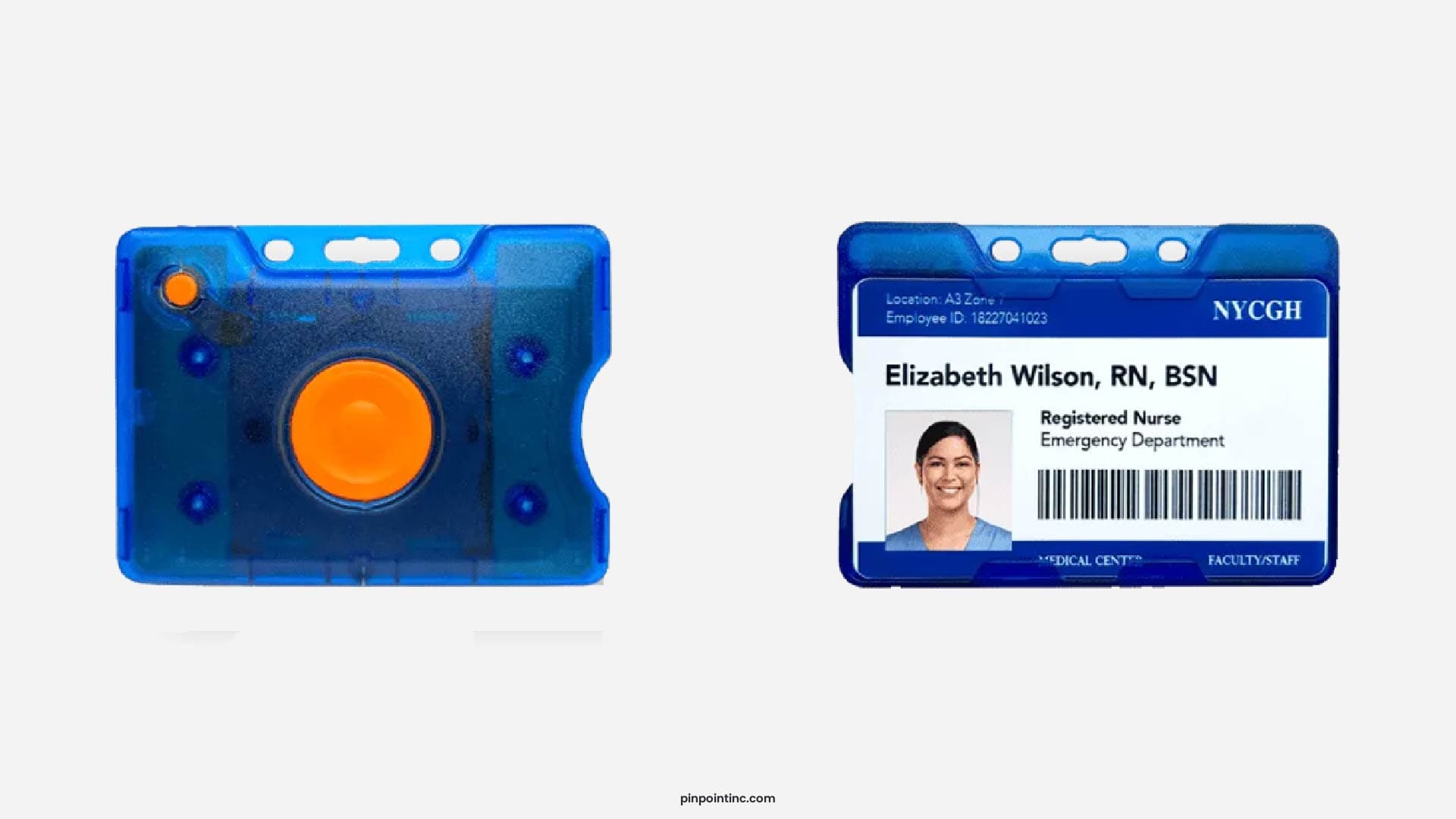
A staff duress system is a safety system designed to let healthcare workers quickly alert others when they need help. It’s typically built around a wearable panic button that staff can carry with them throughout their shift.
What makes it different from other tools is how it works in the moment. Instead of stepping away, unlocking a phone, or searching for a fixed button, staff can trigger an alert instantly while staying in the situation. That’s what makes it useful in environments where things can escalate quickly and response time matters.
Particularly in a hospital or behavioral health setting, that need shows up more often than people expect. Staff are constantly moving between rooms, interacting closely with patients, and dealing with situations that can shift without much warning. So the system has to work wherever they are, and it has to be simple enough to use without thinking twice.
It usually includes one or two buttons; one is used for urgent situations where a fast response is critical. The other can be used earlier, when something feels like it might escalate and support is needed before it gets to that point. That distinction helps teams respond with the right level of urgency instead of treating every alert the same way.
Explore our range of healthcare safety solutions designed to support faster response, improve coordination, and strengthen staff protection across your facility.
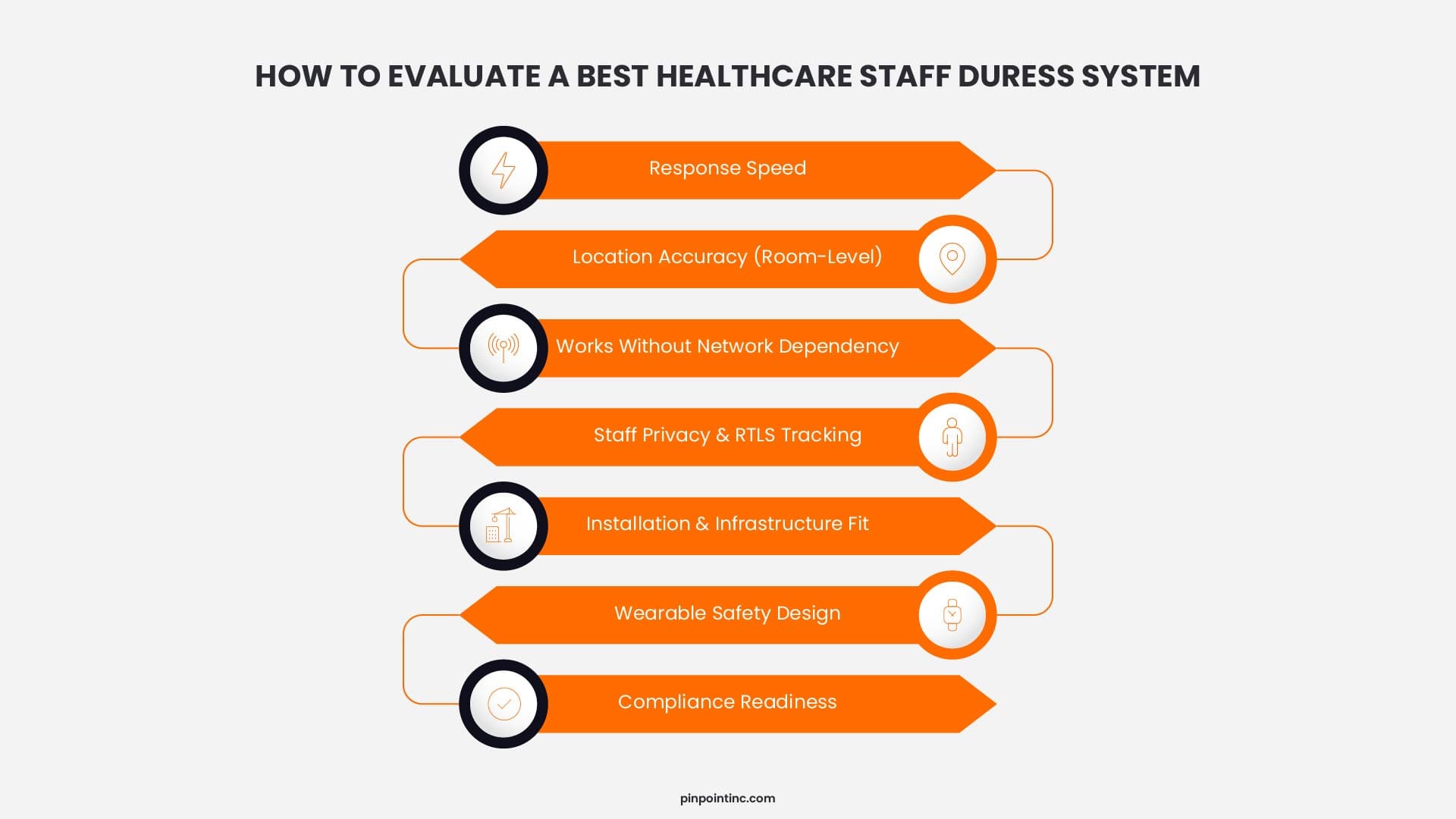
Key Factors to Compare Healthcare Panic Button Systems
When facilities compare staff duress systems, the real question is not whether the button works. It is whether the whole response chain works fast enough, clearly enough, and consistently enough when someone needs help right now. OSHA specifically points to panic buttons as an engineering control in healthcare settings, and the joint commission’s workplace violence requirements expect organizations to have reporting systems, data collection, training, and a broader prevention framework around these events.
Alert Speed and Response Time
Talking about healthcare, even a delay of a few seconds matters because the goal is not just sending an alert, it is getting the right team moving immediately. When buyers hear “fast,” they should ask what happens after the press: how quickly the alert is transferred, who receives it, and whether the system tells responders enough to act without stopping to interpret it.
The Joint Commission also emphasizes data collection and reporting, which matters because response speed is only useful if events can be reviewed and improved over time.
Accuracy (Room-Level vs General Location)
Knowing a staff member is somewhere on a floor is very different from knowing the exact room. General location can still leave security or clinical teams searching, while room-level visibility cuts that delay down and supports a more confident response.
RTLS-based systems are often built around real-time map views and continuous location updates, which can be useful, but facilities should still ask how precise that location really is in their environment.
Works Without WiFi or Network Dependency
This is not just an uptime question, the more a solution depends on connected devices, hospital networks, or broader IoMT infrastructure, the more it becomes part of a larger cybersecurity conversation. Healthcare organizations increasingly rely on interconnected systems and devices, which expands their attack surface and makes them more vulnerable to cyber threats if not properly managed.
Staff Privacy vs Real-Time Tracking
This is where RTLS becomes a bigger conversation than many buyers expect. Some teams like the visibility that real-time tracking provides. Others see continuous tracking as a privacy issue that can affect trust and adoption. If staff don’t want to wear it consistently, the system becomes less effective no matter how advanced it is.
Installation and Infrastructure Requirements
Some systems are faster to deploy because they rely on wireless infrastructure, while others require more planning up front. The trade-off is usually between deployment speed and how much your long-term performance depends on the surrounding environment, signal behavior, device density, and ongoing supervision.
Safety Design (Ligature Risk*, Breakaway)
In behavioral health, the wearable itself has to be evaluated like any other safety-sensitive tool. Breakaway features and ligature-conscious design are not minor details in these environments. They are part of whether the solution is appropriate for the setting in the first place.
*Ligature risk refers to the possibility that a device, cord, or wearable item can be used to harm someone by wrapping it around the neck or another body part. (write this very precisely so reader know what ligature risk means- don’t add this into the website)
Pinpoint vs ROAR for Good: Feature Comparison
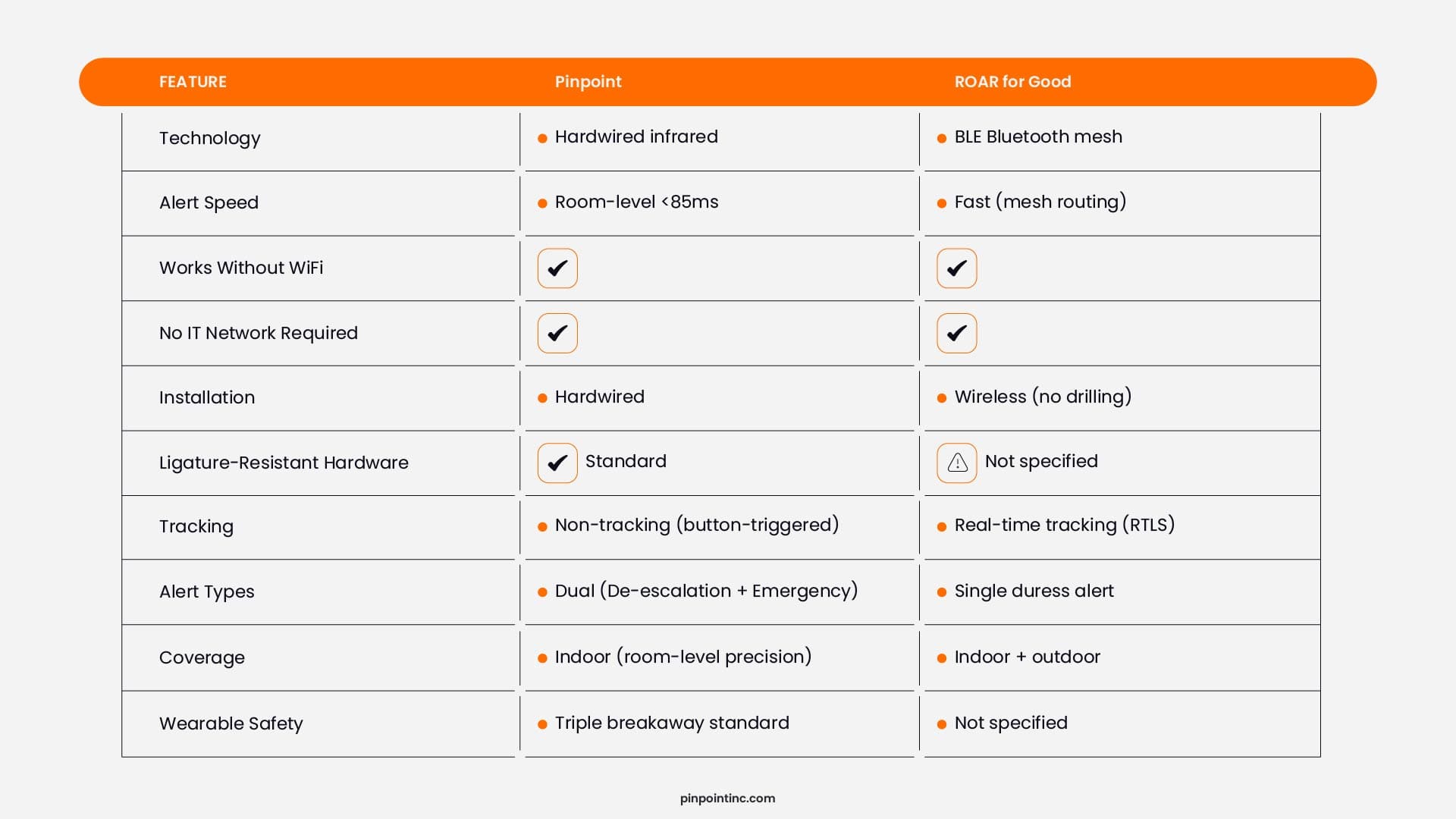
Let’s look at how these two systems actually compare when you put them side by side.
Both Pinpoint and ROAR for Good are built to solve the same problem, giving staff a fast and reliable way to call for help. Where they differ is in how they approach that problem behind the scenes, and those differences start to matter once you think about how the system will perform inside your facility day to day.
Here’s a breakdown of how each system is structured:
Hardwired vs Wireless Panic Button Systems: What's the Difference?
Now that we’ve looked at the feature-level comparison, let’s break down what’s actually happening behind those features in Pinpoint vs ROAR for Good. Understanding the underlying technology helps explain why two systems solving the same problem can perform very differently inside your facility.
How Hardwired Systems Work
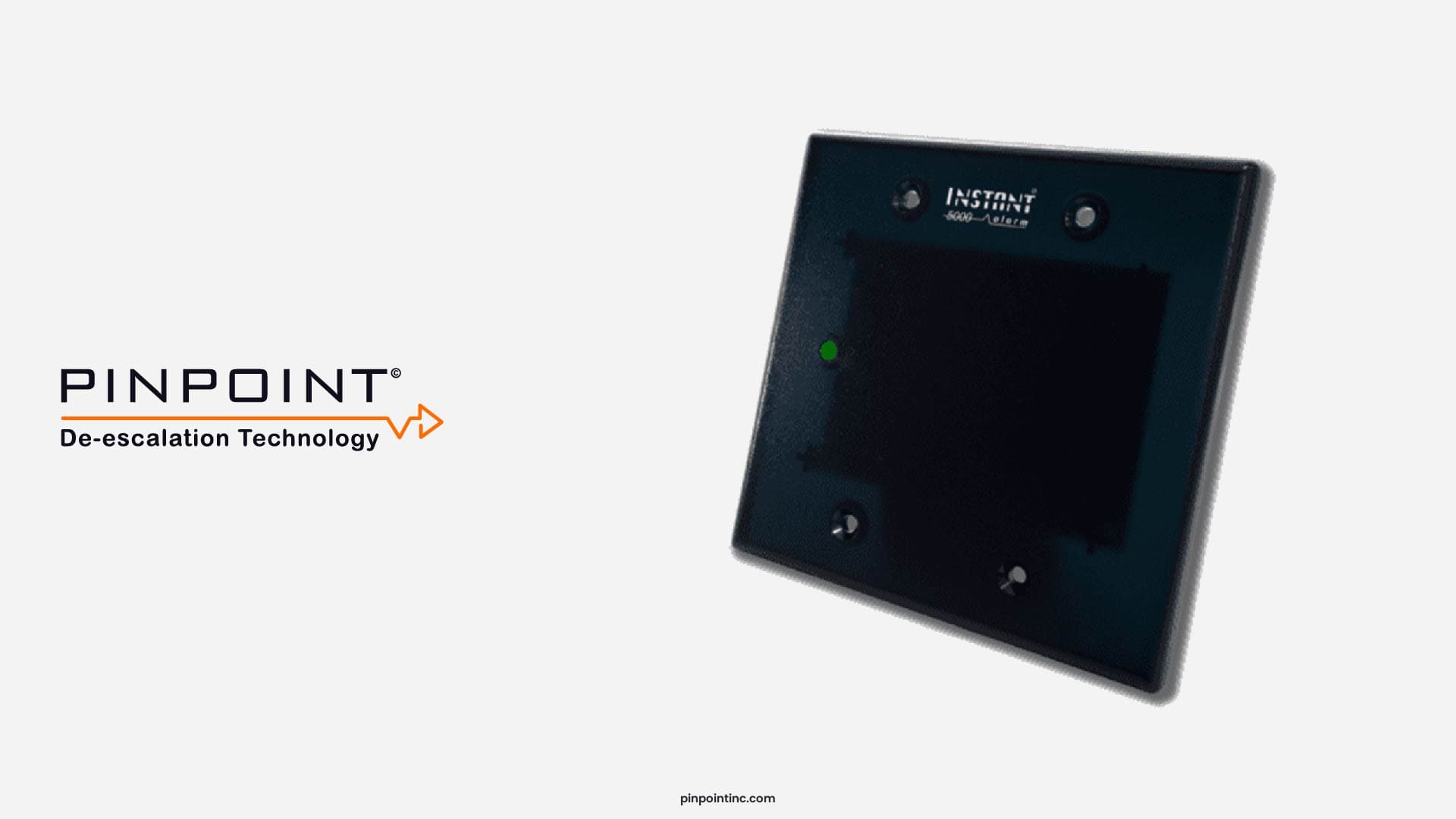
Hardwired systems use dedicated cabling and infrared receivers placed in each room. When a staff member presses their badge, the nearest receiver captures the signal and identifies the exact room. The infrastructure operates independently from your hospital’s network. It is supervised continuously, similar to a commercial fire alarm system.
How Bluetooth Mesh Systems Work
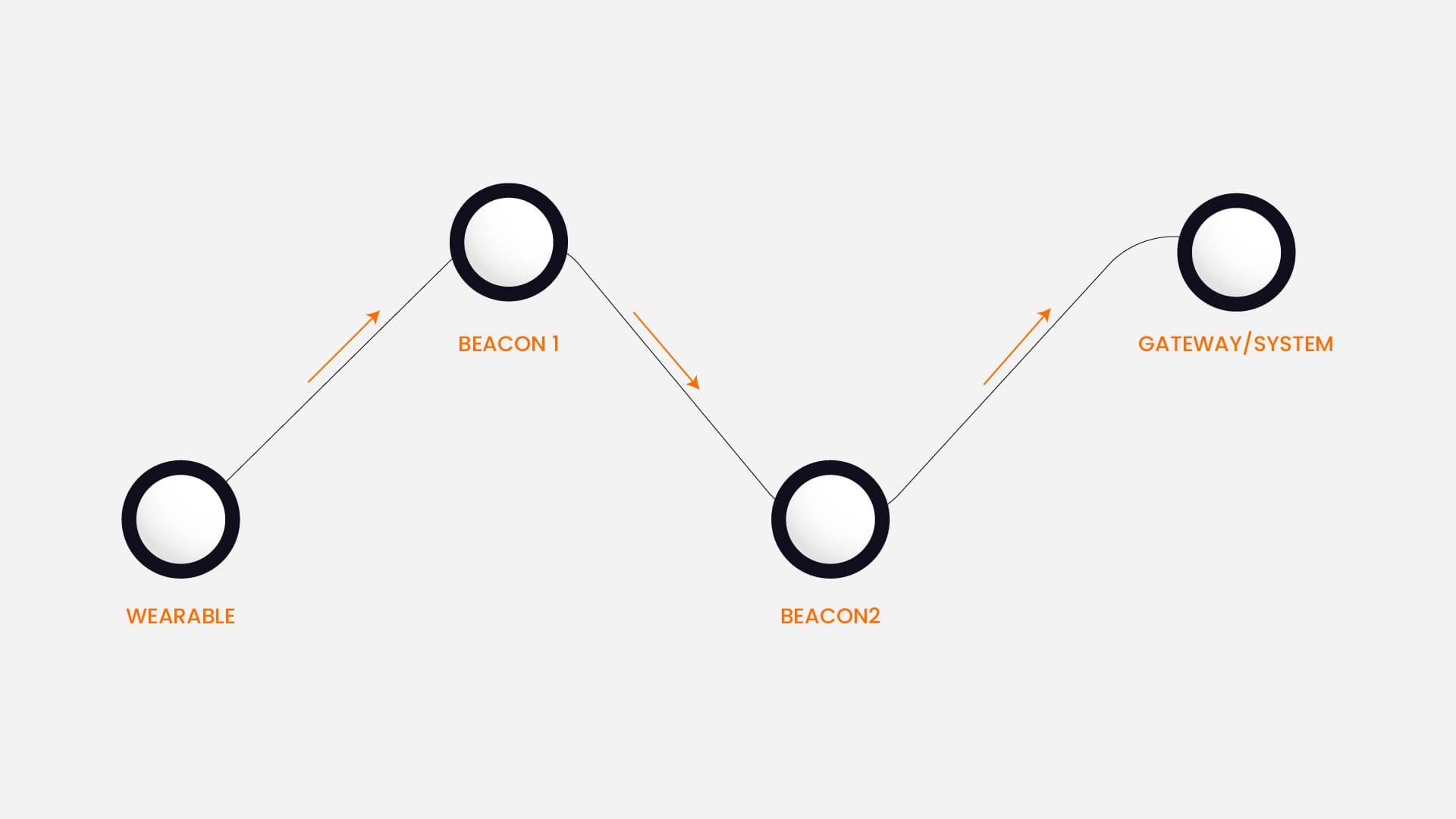
Bluetooth mesh systems use battery-powered beacons positioned throughout your facility. When a badge is pressed, the signal routes from one beacon to the next until it reaches a gateway. The system is wireless, which allows for faster deployment. However, performance depends on mesh stability, beacon battery life, and signal interference.
Which Duress System Is Faster and More Accurate in Emergencies?
When an incident happens, two things matter more than anything else: how fast the alert is triggered and how clearly it tells responders where to go right?
Alert Speed: What Happens After the Button Is Pressed?
With Pinpoint, alerts are triggered in under 85 milliseconds and tied directly to a specific room. There is no routing or handoff between devices, so the signal reaches the system immediately.
ROAR for Good also delivers fast alerts, but the signal is routed through a BLE mesh network. That means it moves from one device to another before reaching the system. While still quick, it introduces an extra step in how the alert travels.
Location Accuracy: Room-Level vs Estimated Location
Speed alone doesn’t solve the problem if responders don’t know exactly where to go. Pinpoint identifies the exact room where the button was pressed, which removes the need for follow-up or confirmation.
With ROAR, location is based on how the signal is received and routed through the mesh. In many cases, it can provide a nearby or general location, but the level of precision depends on how the network is deployed.
A hypothetical scenario: Let’s imagine a patient room, a behavioral health patient becomes agitated and starts throwing objects. A staff member presses their panic button. With Pinpoint, security receives the alert and knows exactly which room within milliseconds. They walk directly to that door. With ROAR, that same button press sends a signal that may hop through three or four beacons down a long hallway before reaching the gateway. Each hop adds a small delay. In a situation where a patient is escalating by the second, those accumulated milliseconds mean responders arrive during the incident rather than before it crosses a critical threshold.
Staff Privacy vs Tracking: Which Approach Works Better?
One of the bigger decisions in a healthcare panic button comparison is how the system handles staff location. Some systems are built around real-time tracking, often using RTLS (Real-Time Location Systems), while others only activate when a button is pressed.
Neither approach is inherently right or wrong, but they tend to work very differently once the system is in use.
Looking for more insights? Explore our healthcare staff safety and panic button guides.
Non-Tracking Approach (Pinpoint)
With a non-tracking system, nothing is monitored in the background. The system activates only when a staff member presses the button.
This approach is often easier for staff to accept because it doesn’t feel like they are being continuously monitored throughout their shift. In many facilities, that leads to more consistent use, especially in environments where trust and autonomy matter.
Real-Time Tracking (ROAR)
Tracking-based systems use RTLS to provide continuous visibility into staff location. This can be helpful for understanding where people are in real time and can support broader operational awareness beyond just emergency alerts.
In some cases, this level of visibility can improve coordination, especially in larger facilities or environments where teams are spread out.
Safety Features: Ligature Resistance and Wearable Design
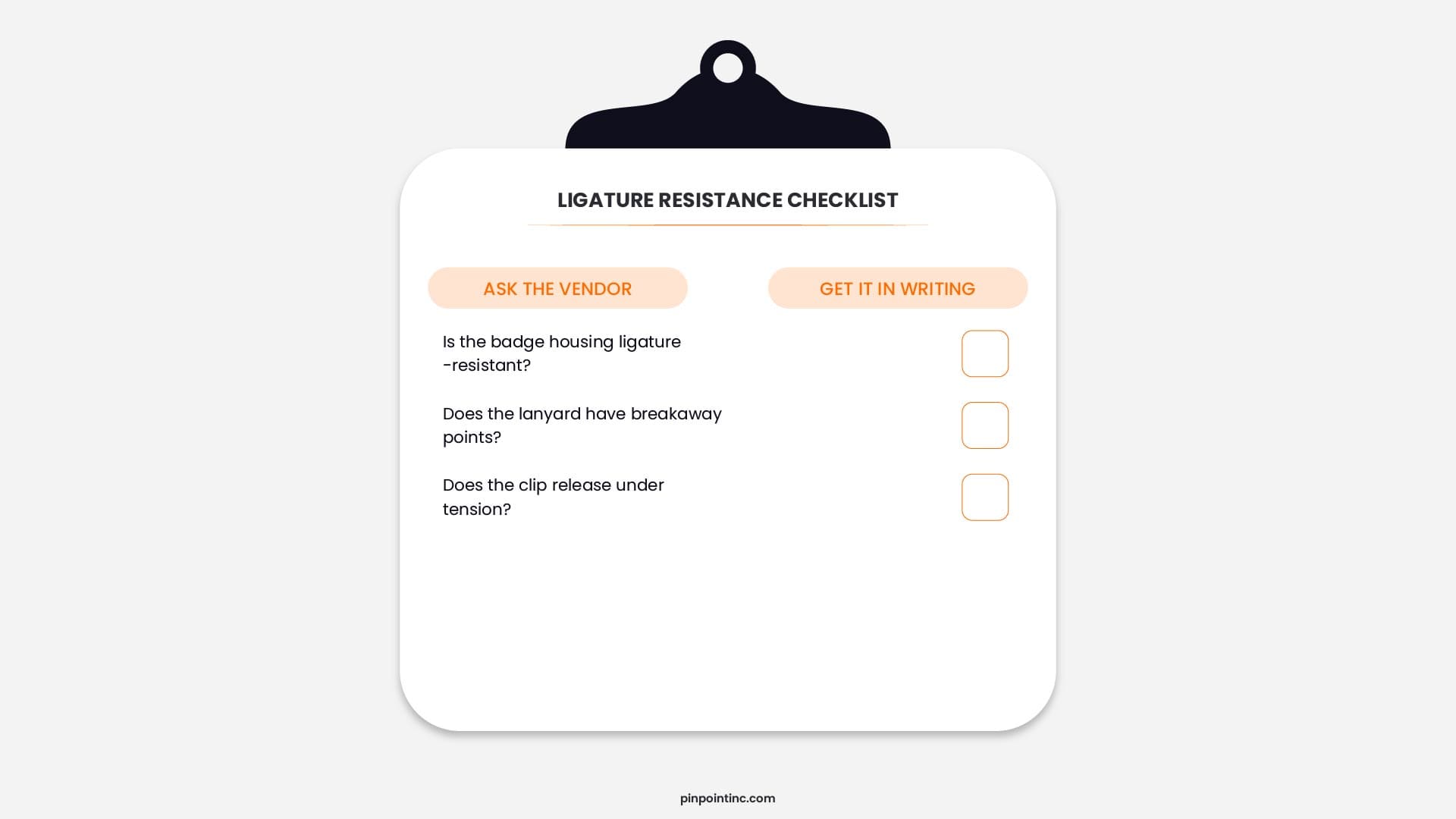
In behavioral health settings, any item worn by staff must be evaluated for self-harm risk. Lanyards, badge clips, and wearable devices can become ligature points if not designed properly.
Pinpoint specifies ligature-resistant hardware as standard across all installations, including a triple-breakaway lanyard that releases under tension.
ROAR for Good does not mention ligature resistance on its website. That does not mean the hardware is unsafe, it means facilities should verify directly with the vendor before purchasing.
Pinpoint vs ROAR for Good: Which Should You Choose?
At this stage, the decision usually comes down to how the system fits into your environment, not just what it offers on paper. To further conclude things:
Choose Pinpoint if:
- You need room-level accuracy to remove any delay in locating incidents
- You prefer a non-tracking system that staff are more comfortable using consistently
- You operate in behavioral health or higher-risk clinical environments
- Your priority is reliability and predictable performance, even during network issues
- You are working within a structured facility (hospital units, controlled environments)
Choose ROAR for Good if:
- You need a system that can be rolled out quickly without major infrastructure changes
- You prefer a wireless setup that can adapt as your facility evolves
- Your environment includes mixed-use spaces or outdoor areas like parking zones
- You value real-time visibility through RTLS tracking
- You need flexibility across different facility types or locations
With all bein said, there isn’t a single “best” staff duress system in 2026 that works for every facility. What stands out as the right choice is the one that aligns with how your teams operate, how your spaces are structured, and how quickly you need response to happen when something goes wrong.
For some facilities, that means prioritizing precision, consistency, and a setup that removes uncertainty during emergencies. For others, it may mean flexibility, faster deployment, and broader coverage across different areas.
If you want to see how Pinpoint works in your environment, you can request a demo.
FAQ’s
What is the difference between RTLS and non-tracking panic buttons?
RTLS (Real-Time Location Systems) track staff continuously, knowing where every badge is at all times. Non-tracking systems like Pinpoint only activate location data when the button is pressed for help. The difference matters for staff privacy, union contracts, and adoption rates. Many healthcare workers refuse to wear continuously tracked devices.
Do healthcare panic buttons work without WiFi?
Yes, many healthcare panic button systems are designed to work without WiFi. Some operate through dedicated infrastructure, while others use private wireless networks like BLE mesh. This allows alerts to be triggered even during network outages, which is important in high-risk healthcare environments.
How do I choose between Pinpoint and ROAR for Good?
Choosing between Pinpoint and ROAR for Good comes down to priorities. If your focus is on room-level accuracy, non-tracking use, and consistent performance, an infrastructure-based system may align better. If you need faster deployment, wireless flexibility, and broader coverage, a mesh-based system may be a better fit.
What is the best staff duress system for healthcare facilities in 2026?
There isn’t a single system that fits every facility. In many healthcare settings, options that offer room-level accuracy without continuous tracking tend to support faster response and stronger staff adoption, while others may prioritize flexibility and quicker deployment depending on their environment.
- What Is a Staff Duress System in Healthcare?
- Key Factors to Compare Healthcare Panic Button Systems
- Pinpoint vs ROAR for Good: Feature Comparison
- Hardwired vs Wireless Panic Button Systems: What's the Difference?
- Which Duress System Is Faster and More Accurate in Emergencies?
- Staff Privacy vs Tracking: Which Approach Works Better?
- Safety Features: Ligature Resistance and Wearable Design
- Pinpoint vs ROAR for Good: Which Should You Choose?
- FAQ’s
Author:
Jordan Belous
Chief Marketing Officer of Pinpoint North America, where she leads marketing strategy, brand development, and digital growth initiatives. She earned a Bachelor of Science in Allied Health with a concentration in physical therapy sciences from the University of Tampa, bringing a unique interdisciplinary perspective that blends healthcare knowledge with modern marketing strategy.
Jordan writes about workplace violence prevention in healthcare, nurse safety, staff wellbeing, and emerging healthcare technologies that support frontline teams. Her work explores how hospitals and behavioral health facilities can build safer environments, reduce burnout and turnover, and implement safety systems that protect staff while preserving trust and dignity.
She is also the Chief Executive Officer of Whip Pediatric Cancer, a nonprofit dedicated to supporting children battling cancer and raising awareness and funds for pediatric cancer. Through her work with Whip, Jordan regularly visits pediatric cancer patients in hospitals and spends time alongside patients, families, and the clinicians who care for them. These experiences place her directly beside nurses and healthcare teams every day and reinforce her belief that the people providing care deserve to feel just as safe as the patients they serve.
Her experiences with Whip and her work at Pinpoint are closely connected, both driven by her deep respect for nurses and frontline healthcare workers. Seeing firsthand the compassion, resilience, and critical role nurses play has strengthened her commitment to advocating for safer healthcare environments and ensuring that those who dedicate their lives to caring for others have the protection and support they deserve.