
Hardwired vs. Wireless Panic Buttons for Hospitals: Which Is Right for You?
The real question isn’t which technology to buy. It’s where the wired part of the system starts and stops, and what happens when it doesn’t.
Ask a facilities director and an IT director the same question, “should our panic buttons be hardwired or wireless,” and the two answers usually come from two different fears. Facilities worries about a cable getting cut behind drywall during the next renovation. IT worries about the hospital’s Wi-Fi network absorbing one more load during a shift-change surge that’s already straining EHR performance. Both are describing the same hardwired vs wireless panic button decision from opposite ends of the same connection, or the lack of one.
This guide breaks the hardwired vs wireless panic button decision into the engineering question underneath it: how does a distress signal travel from the person who needs help to the person who can respond, and what happens to that signal path when something in the building goes wrong. That’s a different question than wearable vs. fixed device selection, which is about the device a staff member carries. Here, the focus is the backbone underneath the device, and how that architecture shapes reliability, room-level accuracy, IT burden, and cost across a hospital’s full footprint.
What "Hardwired" and "Wireless" Actually Mean in a Hospital Panic Button System
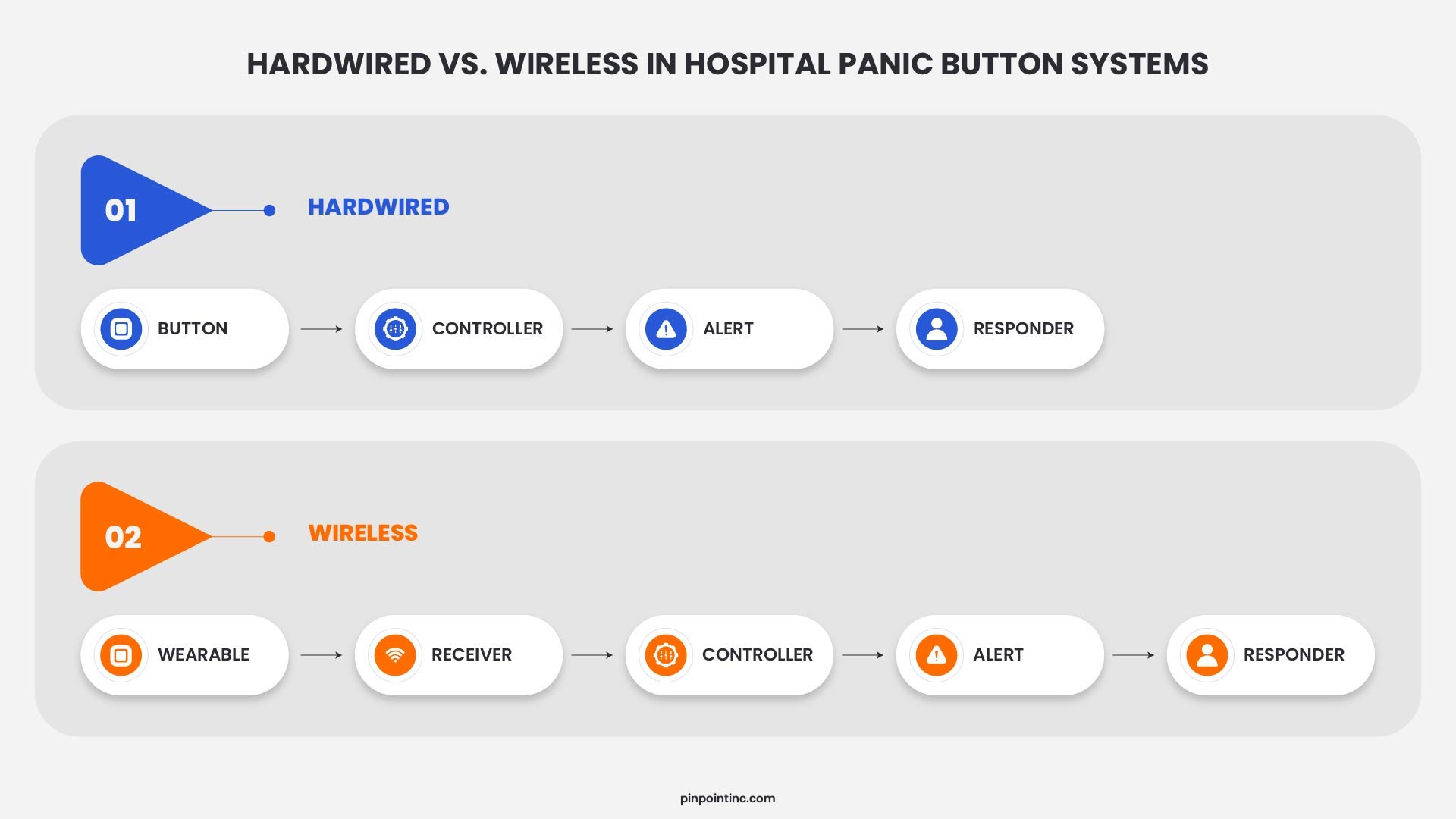
In a hardwired vs wireless panic button system, hardwired and wireless don’t actually describe whether a staff member is tethered to a wall. They describe the connection between the device, the network carrying the alert, and the panel or software that routes it to a responder.
A hardwired system uses physical cabling to connect fixed system components, such as receivers or activation points, back to the infrastructure that processes and routes the alert. Unlike systems that depend on Wi-Fi or other wireless networks for this part of the signal path, the connection is carried through dedicated wired infrastructure.
A wireless system swaps that cable for a radio frequency connection instead: the hospital’s own Wi-Fi, a Bluetooth Low Energy (BLE) mesh of battery-powered beacons, cellular for outdoor coverage, or a proprietary RF protocol built by the vendor.
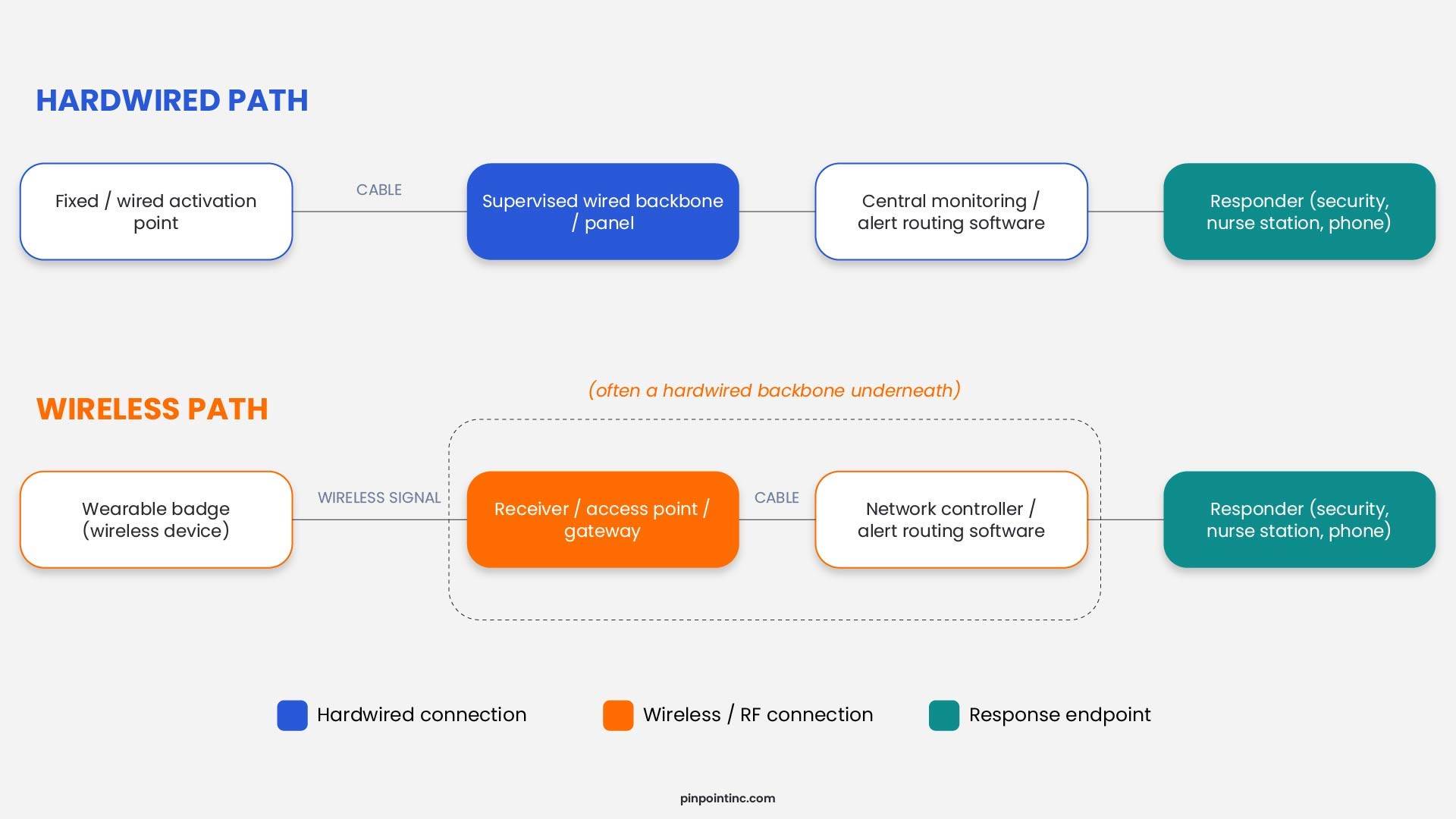
A lot of buyers get tripped up on this part of a hospital panic button comparison: almost nothing on the market is purely one or the other. A wireless badge still needs something listening for it, and that something is usually a fixed network of receivers or access points wired back to a switch or panel. So the real hardwired vs wireless panic button question isn’t which category a hospital picks. It’s where the wireless part of that signal path actually stops, and what’s holding up everything behind it.
Why Hardwired Doesn't Always Mean Fixed
It’s an easy assumption to make in any hardwired vs wireless panic button comparison: hardwired systems bolt a button to a wall, while wireless systems give staff something portable. In practice, those are two different parts of the system.
A wearable device can communicate wirelessly while the infrastructure receiving and routing that alert remains hardwired. Staff carry a wearable badge that communicates using infrared, while supervised, hardwired infrared receivers are installed throughout the facility. The badge moves with the staff member, and the receiver infrastructure stays fixed. That distinction matters in a hospital panic button comparison because the type of device staff carry does not necessarily tell you how the alert travels through the rest of the system. It is also different from the question covered in the guide to wearable vs. fixed duress systems, which focuses on the activation device itself rather than the infrastructure underneath it.
It works the other way too. A hospital can run a fully wireless mesh, no cable to any individual device, and still bolt every activation point to a fixed desk because that’s where the risk actually sits. Wireless signal path, fixed activation point.
Which is why, in a hardwired vs wireless panic button conversation, asking a vendor “is this hardwired or wireless” without also asking where in the signal chain that applies can leave you with two systems that look identical on paper and behave completely differently the moment the network hiccups. A more useful hospital panic button comparison splits the question into three layers: the activation device, the transmission path, and the backbone routing the alert. Mixing architectures across those layers is normal, and most well-designed systems do exactly that.
Hardwired Panic Button Infrastructure: How It Works
Legacy Loops and Structured Cabling
Older nurse call and duress systems run what’s called a supervised loop, usually Class B wiring with an end-of-line resistor, from each button back to a central panel. The panel watches that loop’s resistance around the clock. Cut the wire, short it, or disconnect a device, and the resistance shifts enough for the panel to throw a trouble signal instead of just going quiet. It’s the same supervision logic fire alarm systems use under NFPA 72, which is why a properly maintained legacy loop, decades-old technology and all, rarely fails without telling somebody first.
The panel continuously monitors the circuit. If a wire is cut, shorted, or a device is disconnected, the change can trigger a trouble signal instead of allowing the connection to fail silently. Similar supervision principles are used in fire alarm and signaling systems covered by NFPA 72.
Newer hardwired panic button infrastructure can use dedicated physical cabling to connect receivers, activation points, or other fixed system components back to the infrastructure responsible for monitoring and routing alerts. The exact cabling and power architecture varies by system, but the underlying advantage remains the same: the critical fixed infrastructure can be supervised continuously without depending on the hospital’s Wi-Fi network.
What Hardwired Gets Right, and Where It Struggles
What hardwired buys you is clear, continuous supervision of the fixed infrastructure. If a supervised wired connection is cut, shorted, or disconnected, the system can detect the fault and generate a trouble signal rather than allowing the connection to fail silently. There are also no batteries to manage on the hardwired backbone, and the signal path does not depend on RF coverage that can be affected by dense construction materials or shielded areas within a hospital.
Where hardwired infrastructure can become more demanding is installation. Pulling cable through a hospital that is still seeing patients may require routing around fire-rated walls, coordinating access to clinical areas, and scheduling work to minimize disruption to patient care. Retrofitting an older or occupied wing can therefore take longer than deploying infrastructure that requires less cabling, and future layout changes may require additional cable runs rather than simply repositioning wireless hardware.
Wireless Panic Alarm Infrastructure: How It Works
Wi-Fi, BLE, Cellular, and Proprietary RF
Wireless duress systems generally run on several common RF approaches, and which one a vendor picked affects reliability just as much as the hardwired vs wireless panic button decision itself.
Some platforms ride on the hospital’s existing enterprise Wi-Fi. Setup is quick since the network’s already there, but now the system shares bandwidth and access points with EHR terminals, infusion pumps, and VoIP phones. A congested access point at shift change, or a firmware push that knocks an SSID offline, can interrupt alert delivery, the same weak spot RTLS-based location systems run into, covered in more depth in the guide to RTLS alternatives for hospital staff safety.
BLE mesh setups use battery-powered beacons to estimate where a badge is. BLE performance depends heavily on building construction, beacon placement, and signal conditions, and thick concrete or shielded rooms can still leave dead zones that need extra beacon density to close.
For parking structures and outdoor walkways, some systems fall back on cellular or LTE, which gets coverage past the building envelope but ties it to carrier signal strength, which can vary in areas such as below-grade garages. A smaller group of vendors builds on a proprietary RF protocol that never touches hospital Wi-Fi or cellular, sidestepping congestion at the cost of depending more heavily on that vendor’s own receiver hardware for future expansion.
What Wireless Gets Right, and Where It Struggles
Speed of installation is the obvious win. No cable to individual devices means a system can often be deployed faster than a fully hardwired installation, and moving a beacon after a unit gets redesigned just means remounting hardware, not opening a wall. Mobility comes naturally too, since a wearable device was never tied to a cable to begin with.
The tradeoff shows up in basic physics. RF signal weakens with distance and material density, and hospitals are full of exactly the concrete, rebar, and shielding that create dead zones for RF-based systems. Coverage gaps can create risk if the system is not properly designed, tested, and supervised.
Anatomy of a Hardwired vs. Wireless Signal Path
Failure Modes and System Supervision: What Actually Breaks
The hardwired vs wireless panic button debate usually gets framed as a reliability contest: wired wins because cable “doesn’t lie.” That’s an oversimplification. NFPA 72’s 2022 edition recognizes supervised wireless mesh networks using listed components as an acceptable alarm communications method. Reliability depends heavily on system supervision, design, and how failures are detected, not simply whether the connection happens to be copper or radio.
A supervised connection, wired or wireless, checks its own health constantly and throws a distinct trouble signal the second something changes: a cut wire, a dead battery, a receiver that’s stopped responding. An unsupervised one just goes quiet, and a quiet duress device looks exactly like one nobody’s pressed.
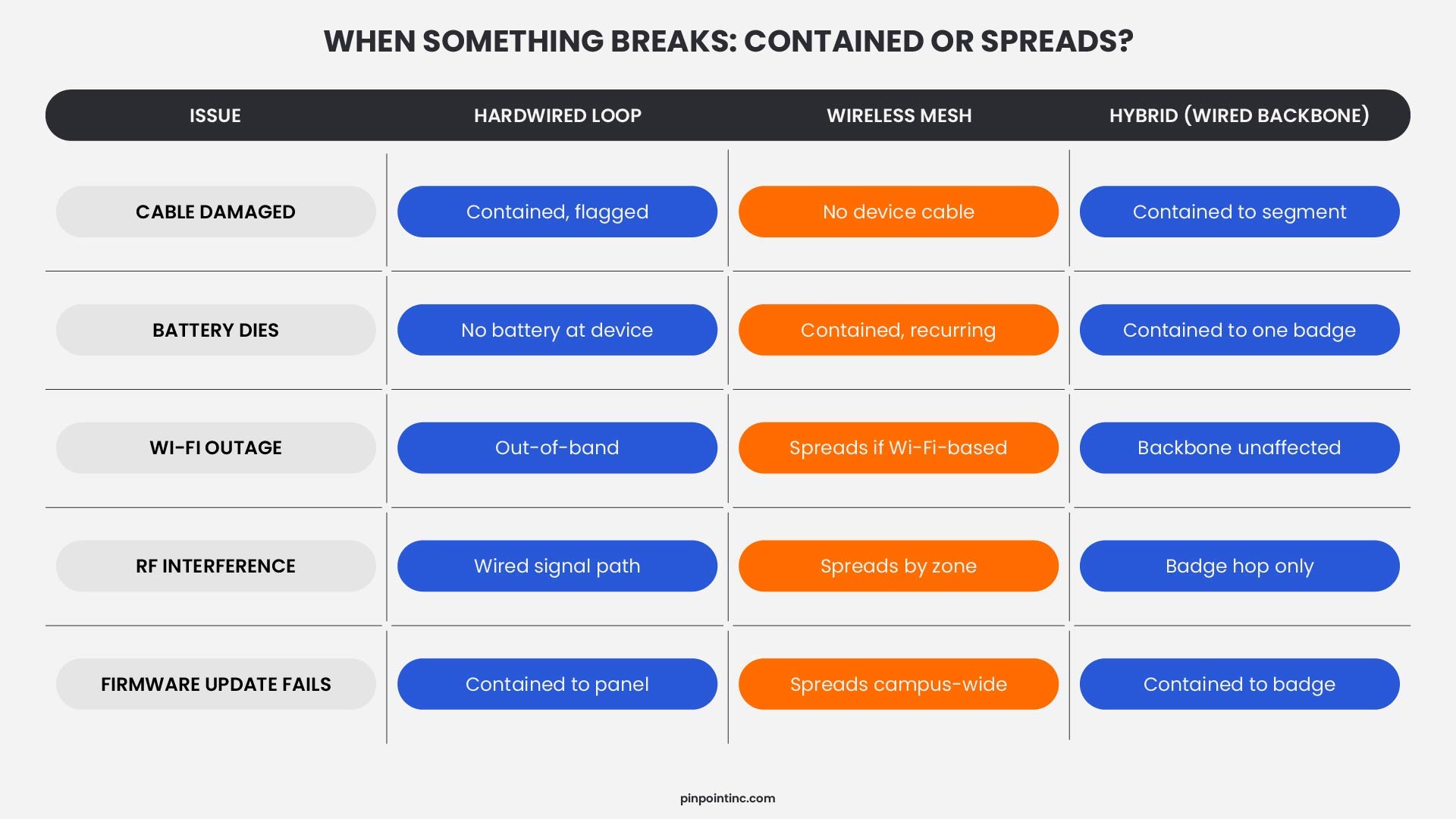
Where the two architectures really diverge is what a typical failure looks like day to day. A hardwired loop tends to fail physically and locally, a nicked cable, a loose termination, usually taking down one device while a supervised panel flags it right away. A wireless system tends to fail environmentally and broadly: a firmware update knocks an access point offline, a Wi-Fi outage silences every device on that network at once. Because that kind of failure can hit a lot of devices at the same moment, a wireless outage often has a bigger blast radius even when the actual cause is smaller.
The question worth asking in a hospital panic button comparison isn’t “hardwired or wireless.” It’s how the system is supervised, and how many devices go dark if one single thing fails. A well-supervised wireless mesh with distributed access points can easily beat an unsupervised wired loop, and the reverse holds too.
Hardwired vs. Wireless vs. Hybrid: Side-by-Side Comparison
Laid out next to each other, the tradeoffs are a lot easier to see than to describe in paragraph form.
| Factor | Hardwired | Wireless | Hybrid |
|---|---|---|---|
| Typical install time | Weeks per floor, cabling-dependent | Days, hardware-mount only | Days to weeks, depending on receiver density |
| Location accuracy | Room-level, deterministic | Zone- to room-level, depending on beacon density | Room-level via wired receivers; mobility via wireless badge |
| Failure mode | Localized, cable-specific | Can be distributed, network-wide | Localized backbone; isolated badge issues |
| IT network load | None (out of band) | Adds load if Wi-Fi-based | Minimal, architecture-dependent |
| Renovation flexibility | Low, requires new cable runs | High, remount hardware | Moderate |
| Best fit | New construction, shielded rooms, fixed high-risk points | Retrofits, outdoor/campus coverage | Most occupied hospitals balancing mobility and reliability |
None of that matters much until you trace what actually happens the moment someone needs help. Here’s that same architecture question, followed through a single button press.
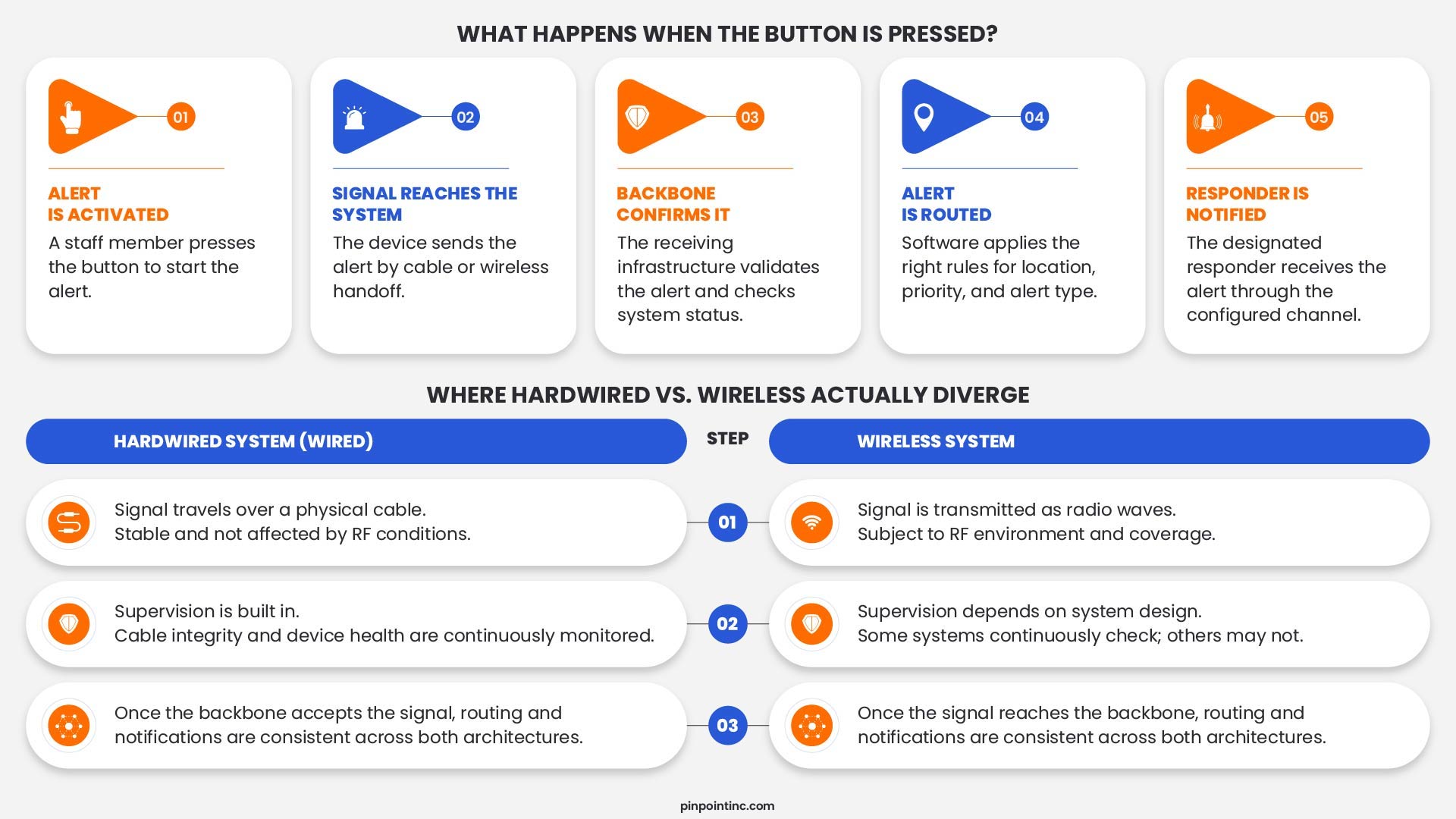
Location Accuracy and Network Dependency
This is where the wired backbone sitting underneath a wireless badge really earns its keep. A hardwired receiver network, ceiling-mounted infrared or a dense grid of wired access points, gives you a deterministic answer: the device registered at a specific receiver, or it didn’t. No probability involved. That’s how systems built on hardwired, supervised receivers land on consistent room-level accuracy instead of an educated guess.
Wi-Fi and BLE-based location usually works by triangulation, comparing signal strength across several access points or beacons to estimate where something is. That’s a probability, not a certainty, and how tight it gets depends on beacon density and how much RF interference the building is throwing off that day. A sparse BLE setup might only narrow things down to “east wing, second floor.” A dense one can get close to room-level accuracy, but the hardware and calibration to get there cost real money.
This deserves more room than fits here; the comparison of RTLS alternatives for hospital staff safety goes deeper into it. For the hardwired vs wireless panic button question specifically: if room-level accuracy is non-negotiable, the receiver layer needs either a wired backbone or a wireless deployment dense enough to match that precision, and you’re paying for that density either way.
IT Burden and Network Dependency
Every device added to a hospital’s Wi-Fi network is one more thing competing for airtime, and one more endpoint IT has to patch, segment, and keep an eye on. A wireless panic button system riding on enterprise Wi-Fi inherits whatever congestion and patch schedule already governs that network, good or bad.
Systems running on an isolated, out-of-band connection, a hardwired backbone or a proprietary RF protocol that never touches hospital Wi-Fi, sidestep all of that. If the core network goes down for maintenance or an outage, an out-of-band system keeps working, because it was never plugged into that network to begin with. That isolation also shrinks the attack surface, since there’s no path from the hospital’s IT network into the duress system.
The tradeoff is integration. A wireless system built on standard protocols usually connects more easily to EHR platforms and nurse call systems through open APIs, since it’s already speaking the same language. A fully isolated hardwired system might need a dedicated gateway to talk to anything outside itself. For a hospital running lean on IT staff working through this hospital panic button comparison, it comes down to which burden you’d rather carry: one more device class to patch, or one more standalone system to maintain outside the network entirely.
Installation, Maintenance, and Cost
Cost comparisons in a hardwired vs wireless panic button decision usually zero in on the wrong line item. The device itself is rarely what costs the most. Labor, cabling, and upkeep are.
Hardwired installs put most of the cost up front, skilled low-voltage labor and whatever construction it takes to route cable. Once it’s in, though, a wired system has almost nothing recurring, no batteries on the backbone, no data plan. Wireless installs cost less up front since there’s no cable to pull, but that savings shows up later as battery swaps, possible per-device fees, and periodic RF surveys to catch new dead zones.
A real five-year total cost of ownership needs both halves of that math, not just the install invoice. The healthcare panic button system cost breakdown gets into unit pricing, licensing, and maintenance line items in more detail than fits here. As a rule of thumb: hardwired costs more up front and less over time, wireless costs less up front and more over time, and which one wins a five-year comparison depends on facility size, how often the building gets renovated, and how many devices need covering.
Which Architecture Fits Your Hospital?
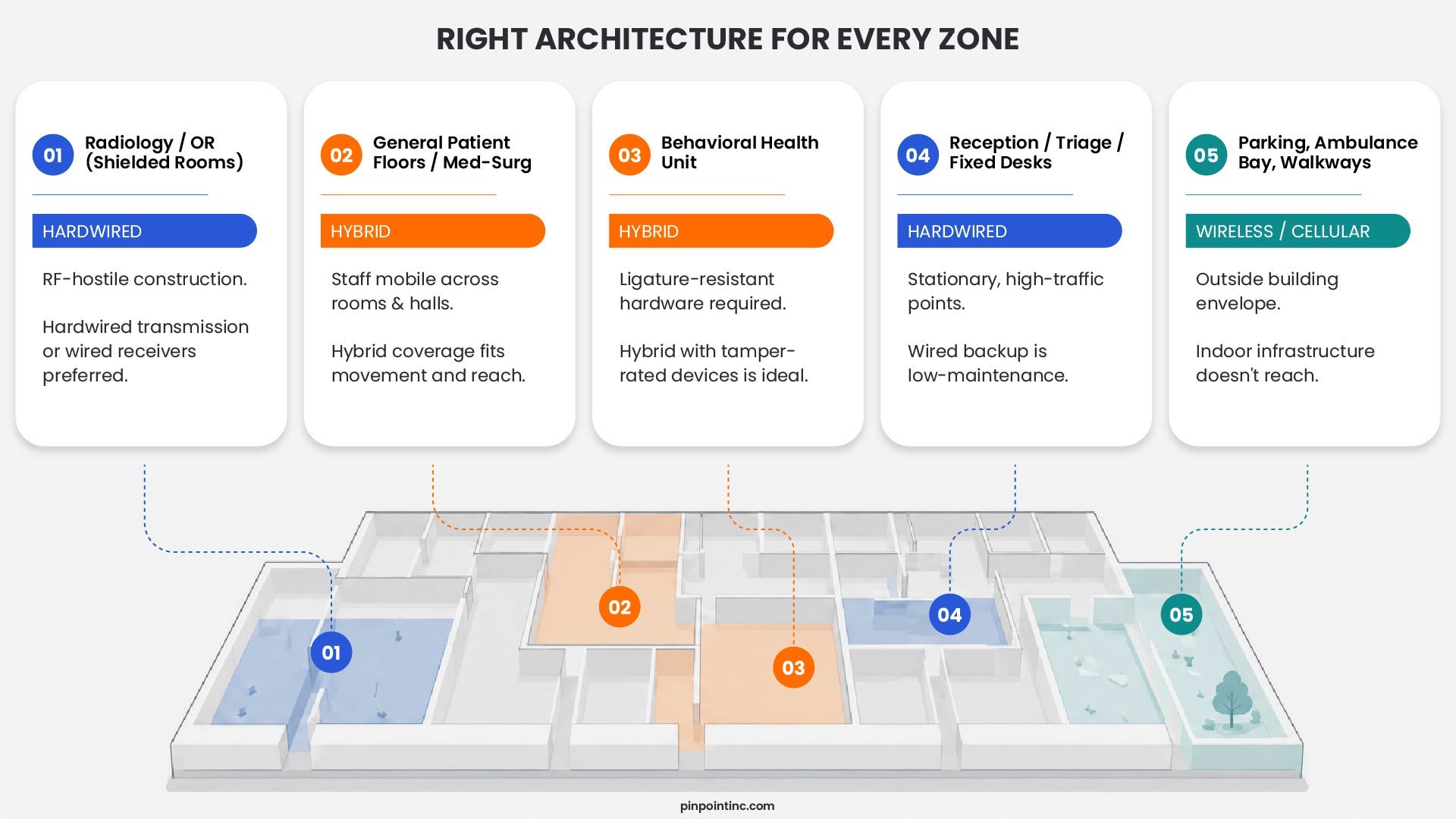
Most hospitals don’t need to pick one architecture for the whole building. The more useful move is mapping architecture to zone, the same way the guide to wearable versus fixed devices maps device type to risk area.
New construction or a full gut renovation takes the biggest argument against hardwired off the table, since cable can go in before the drywall does. There, a wired backbone for fixed high-risk points, paired with wireless badges for staff on the move, is usually the cheaper option over the system’s lifetime. An occupied building with a tight renovation budget tends to favor wireless for any area needing new coverage, since running cable through finished, occupied space is disruptive. A hardwired backbone already in place from an earlier build is usually worth extending rather than ripping out.
Radiology, OR suites, and anything with lead shielding are rough environments for RF signal and tend to hold up better with a hardwired connection. Behavioral health units add another wrinkle: anything mounted where a patient can reach it has to be ligature-resistant and tamper-resistant, narrowing what hardware qualifies regardless of transmission method. Parking structures, ambulance bays, and walkways between buildings sit outside the building envelope, so they usually need cellular connectivity or a hardwired network extended well past normal indoor reach.
For a hospital juggling all of these zones under one roof, which describes most hospitals, a single answer to “hardwired or wireless” rarely survives contact with the actual floor plan.
Hybrid Architecture: The Practical Middle Ground
The architecture that actually shows up most in a real-world hardwired vs wireless panic button rollout isn’t purely hardwired or purely wireless. It’s a wireless activation device, a badge or wearable, talking to a hardwired, supervised receiver network built into the building. The badge stays wireless because staff need to move without being tied to anything. The receiver network stays hardwired because that’s exactly where supervision, room-level accuracy, and interference resistance matter most.
Pinpoint’s platform runs on this model. The wearable badge transmits wirelessly, while the ceiling-mounted receiver network is hardwired and supervised around the clock, so a connectivity issue gets flagged the moment it happens instead of showing up during an actual incident. Because that receiver backbone doesn’t depend on hospital Wi-Fi, alert delivery doesn’t change when the network gets congested, goes down for maintenance, or gets reconfigured for reasons that have nothing to do with staff safety.
If you’re working through a hardwired-versus-wireless decision for your own hospital, this hybrid pattern is usually less about splitting the difference and more about not having to choose at all. The wireless half covers mobility. The hardwired half covers reliability and precision. Neither one has to give something up for the other.
Next Step
See How This Looks in Your Facility
A spec sheet can't show you how a receiver network actually performs against your floor plan, your wall construction, and your IT environment.
Walking through your building and your specific high-risk zones is the only real way to see whether hardwired, wireless, or a hybrid layout gets your nurses and staff the fastest, most reliable path to help.
See how a supervised, hardwired receiver network performs against your own floor plan.
FAQ’s
What's the difference between a hardwired and wireless panic button system?
A hardwired system connects fixed system components to a panel or controller through physical cable, which can carry the signal and, depending on the system, power. A wireless system uses RF technologies such as Wi-Fi, BLE, cellular, or proprietary protocols instead of a physical cable for part of the signal path. Some systems combine both architectures, pairing a wireless or infrared wearable with a hardwired receiver backbone.
Is a hardwired panic button system more reliable than a wireless one?
Not automatically. NFPA 72 recognizes supervised wireless mesh networks using listed components as an acceptable communications method. Reliability depends on system design, supervision, and how failures are detected, not simply whether the connection is copper or radio.
Can wireless panic buttons work in shielded rooms like radiology or the OR?
RF signals generally struggle to penetrate lead shielding and dense concrete, making these rooms a common weak point for Wi-Fi or BLE-based systems. Facilities often use a hardwired connection, for the transmission path or a wired receiver inside the shielded space, to maintain coverage.
Does a wireless panic button system add load to hospital Wi-Fi?
Only if it’s built on the hospital’s existing Wi-Fi network. Systems using a dedicated BLE mesh, proprietary RF protocol, or hardwired receiver backbone operate independently of hospital Wi-Fi and don’t compete for bandwidth.
What's the typical installation timeline difference between hardwired and wireless systems?
Hardwired installations generally take longer because of cabling and construction, often weeks per floor in an occupied building. Wireless installations can go live faster, though a hybrid system with a hardwired receiver backbone falls somewhere in between depending on receiver density.
Can a hospital mix hardwired and wireless panic button technology in the same building?
Yes, and most hospitals do. A common approach uses hardwired, supervised receivers for room-level accuracy, paired with wireless wearable badges so staff aren’t tethered to one location. Coverage can also vary by zone, with shielded rooms, behavioral health units, and outdoor areas each using the architecture suited to their conditions.
- What "Hardwired" and "Wireless" Actually Mean in a Hospital Panic Button System
- Why Hardwired Doesn't Always Mean Fixed
- Hardwired Panic Button Infrastructure: How It Works
- Wireless Panic Alarm Infrastructure: How It Works
- Failure Modes and System Supervision: What Actually Breaks
- Hardwired vs. Wireless vs. Hybrid: Side-by-Side Comparison
- Location Accuracy and Network Dependency
- IT Burden and Network Dependency
- Installation, Maintenance, and Cost
- Which Architecture Fits Your Hospital?
- Hybrid Architecture: The Practical Middle Ground
- FAQ’s
Author:
Jordan Belous
Chief Marketing Officer of Pinpoint North America, where she leads marketing strategy, brand development, and digital growth initiatives. She earned a Bachelor of Science in Allied Health with a concentration in physical therapy sciences from the University of Tampa, bringing a unique interdisciplinary perspective that blends healthcare knowledge with modern marketing strategy.
Jordan writes about workplace violence prevention in healthcare, nurse safety, staff wellbeing, and emerging healthcare technologies that support frontline teams. Her work explores how hospitals and behavioral health facilities can build safer environments, reduce burnout and turnover, and implement safety systems that protect staff while preserving trust and dignity.
She is also the Chief Executive Officer of Whip Pediatric Cancer, a nonprofit dedicated to supporting children battling cancer and raising awareness and funds for pediatric cancer. Through her work with Whip, Jordan regularly visits pediatric cancer patients in hospitals and spends time alongside patients, families, and the clinicians who care for them. These experiences place her directly beside nurses and healthcare teams every day and reinforce her belief that the people providing care deserve to feel just as safe as the patients they serve.
Her experiences with Whip and her work at Pinpoint are closely connected, both driven by her deep respect for nurses and frontline healthcare workers. Seeing firsthand the compassion, resilience, and critical role nurses play has strengthened her commitment to advocating for safer healthcare environments and ensuring that those who dedicate their lives to caring for others have the protection and support they deserve.