
What Is a Panic Button? A Complete Taxonomy of Types, Uses, and Technologies

That is the reality for thousands of healthcare workers, teachers, and hotel employees every year. A panic button seems simple, but the market offers dozens of variations. Wearable or fixed, silent or audible, GPS tracked or location free, app based or dedicated hardware, and supervised or unsupervised.
Each choice carries real consequences. Pick the wrong type, and your staff may have a device that looks right but fails when it matters most.
This guide builds a complete taxonomy of panic buttons. It covers every major category (wearable, fixed, mobile app), sub type (duress, audible alarm, GPS enabled), use case (healthcare, schools, lone workers), and decision factor. Organized into four independent dimensions, it helps you map any device to your specific needs.
Key Takeaways
- The right system depends on four decisions: how the device is worn or installed, where it will be used, how it alerts responders, and what communication method it relies on.
- A wearable duress badge may work well for hospital staff, while fixed panic buttons may suit reception desks, and GPS-enabled devices may be better for lone workers outdoors.
- In healthcare, retail, hospitality, and behavioral health settings, an audible alarm can escalate the situation. A silent alert lets staff request help without drawing attention.
- Hospitals, schools, and large facilities usually need indoor coverage through RF-based or supervised systems that can support in-building location context without continuous GPS tracking.
- A panic button system should confirm that devices are connected, ready, and able to send an alert before an emergency happens, not only after someone presses the button.
What Is a Panic Button and Why Does the Type Matter?
A panic button is any device, hardware or software, that a person can activate quickly to signal an emergency and request immediate assistance. The signal triggers an alert to a designated recipient: a security team, a supervisor, a monitoring center, or in some cases, 911 directly.
That is where the simplicity ends. The term “panic button” covers everything from a low cost keychain alarm that emits a loud siren to a sophisticated wearable system that silently routes an encrypted alert, with the staff member’s real time in building location, to a staffed security desk.
All without any visible action that could provoke a threatening individual.
According to the U.S. Bureau of Labor Statistics, an average of 57 healthcare workers are injured every day due to workplace violence - resulting in lost workdays, job reassignment, or the need for medical care.
Why does the type matter? Because the wrong type can fail silently. A WiFi dependent panic button stops working the moment a router goes down. A GPS reliant wearable becomes useless inside a multi story building. An audible alarm pressed in front of an agitated patient might escalate the encounter into a physical assault. The stakes are too high for a one size fits all approach.
To organize the market clearly, we can classify every panic button across four independent dimensions. Think of it as a four axis decision framework. A complete specification requires a choice on all four.
Dimension 1: Taxonomy by Form Factor
What Is Form Factor in Panic Buttons?
Form factor refers to the physical shape and deployment method of a panic button. It determines where the device lives, who carries it, and how quickly a person can activate it under stress. Three primary form factors exist, each with distinct sub types.
Wearable Panic Buttons
Wearable panic buttons are the fastest growing category in the market. They are worn directly on the body, so the device is always within reach. No need to reach a wall mounted unit or unlock a phone.
Sub types include:
- Badge clip wearables – Attach to a staff ID badge and match the size of a standard ID card. Common in healthcare and corporate environments. They are discreet but positioned where the hand naturally reaches in a crisis.
- Lanyard or pendant wearables – Worn around the neck. Common in schools and senior care facilities. Some designs extend to discreet smart jewelry that looks nothing like a safety device. Useful when the wearer needs to avoid triggering alarm in a high risk interaction.
- Wristband wearables – Worn on the wrist like a watch. More visible than badge or lanyard options. Visibility can serve as a deterrent but may not suit environments that require discretion.
Why wearables work:
A nurse being assaulted in a patient room, a teacher confronting an intruder in a hallway, or a hotel worker harassed in a guest room can all activate a wearable with a single motion. No wall panel, and no phone screen.
Fixed and Stationary Panic Buttons
Fixed panic buttons are mounted in specific locations: under a desk, on a wall, behind a counter, or at a reception station. They have been the dominant form factor in banking and retail for decades.
Sub types include:
- Under desk buttons – The classic bank teller setup. A discreet button mounted beneath the work surface. A teller or receptionist can press it with a knee or hand without any visible movement. Still widely used in financial institutions, legal offices, and any workplace with a fixed service counter.
- Wall mounted units – Installed in corridors, stairwells, or high risk zones like psychiatric ward dayrooms. Useful for shared spaces where individuals may need to summon help without being tied to a specific desk.
- Wireless fixed buttons – Look like fixed units but communicate wirelessly to a central hub. Easier to install with no cable runs. Common in facilities that need coverage across multiple rooms without the cost of a hardwired build out.
Limitation: Fixed buttons only work when the person is within arm’s reach. In a mobile environment, a nurse cannot always get back to the wall panel before a situation escalates.
Mobile App Based Panic Buttons
App based systems turn a smartphone into a panic device, typically through a dedicated safety app with a large, easy to press emergency button. Some platforms also allow activation via a hard button press sequence (volume keys or power button) to avoid unlocking the screen.
Sub types include:
- Standalone safety apps – Apps like Rave Guardian or SafeZone run on standard iOS and Android devices. Easy to deploy without new hardware. But they depend on the phone being charged, unlocked or accessible, and connected to cellular or WiFi at the moment of the incident.
- Computer based software buttons – A software defined panic button on a desktop or laptop. Useful for office workers at a fixed workstation. Less practical for mobile staff.
Key drawback: App based systems have low upfront costs, but they inherit every vulnerability of the smartphone they live on. Battery life, network connectivity, and the fine motor requirement of navigating a touchscreen under acute stress. They also do not work if the phone is left at a desk, dropped in an altercation, or dead.
Dimension 2 - Taxonomy by Industry and Setting
Industry and Setting
Beyond form factor, the right panic button system is shaped by the specific dynamics of the industry deploying it. Different environments have radically different threat profiles, compliance requirements, building layouts, and staff workflows.
Healthcare and Hospital Settings
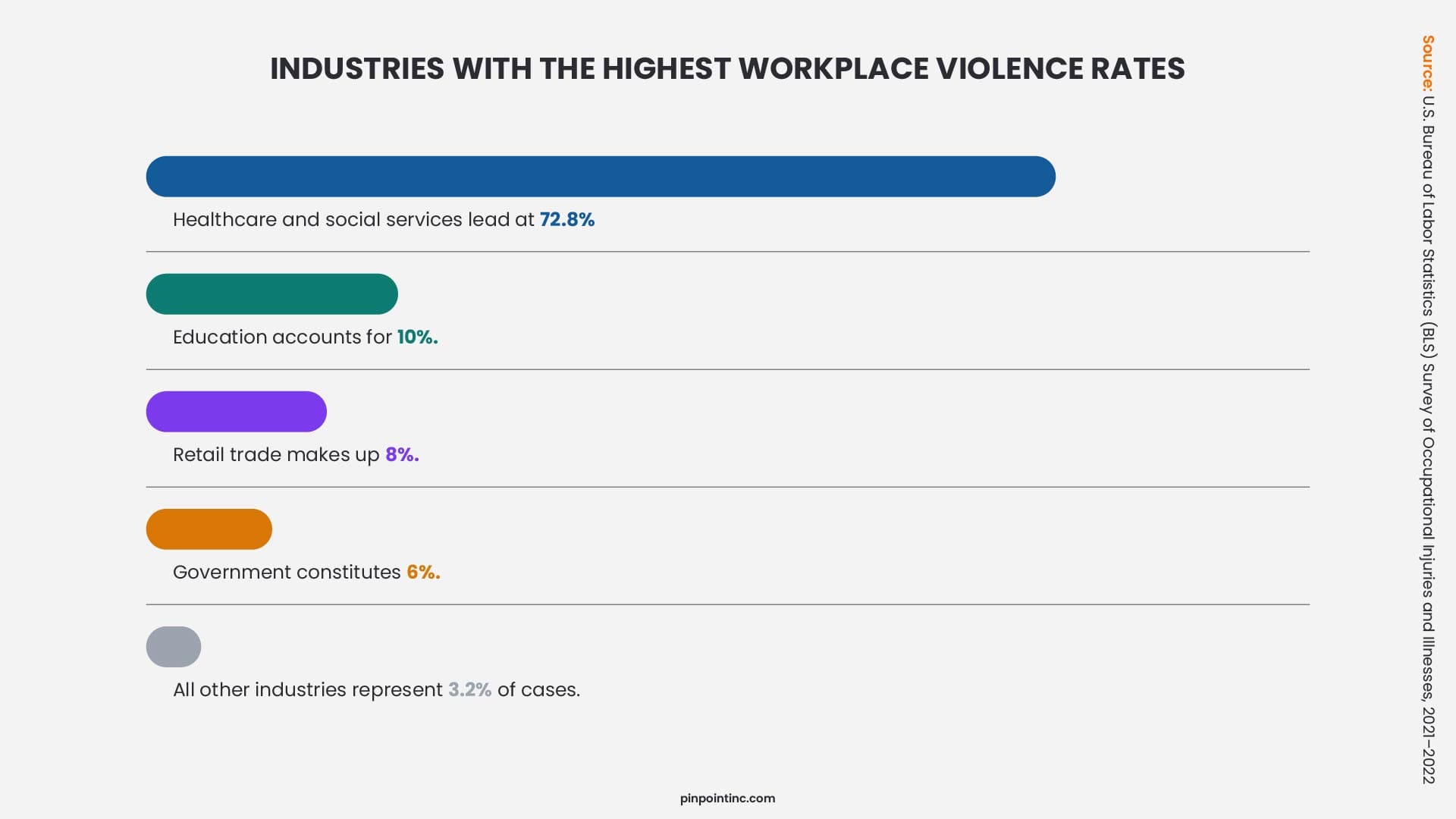
Healthcare is the highest-risk environment for workplace violence in the U.S. It accounts for 73% of all nonfatal workplace injuries and illnesses due to violence. Unlike most industries where violence comes from external criminals, healthcare violence is predominantly perpetrated by patients or clients. This means the threat is often already inside the building and physically close to staff.
This environment demands a panic button that is silent, wearable, and internally routed. An audible alarm could escalate a situation, while a silent alert to on-site security with real-time location tracking is more effective. Different healthcare subsets have distinct needs:
- Psychiatric wards need robust, tamper-resistant wearables.
- Emergency departments require devices that can be activated with one hand.
- Home health aides need a solution that works outside a building’s network.
K-12 Education Settings
Schools present a distinct threat profile: an active armed intruder. Panic buttons are for teachers and staff to initiate a lockdown or contact law enforcement silently. Alyssa’s Law, which mandates silent panic alerts directly linked to law enforcement, has been enacted in 14 states as of early 2026. The primary scenario is an active threat, and the primary users are teachers and administrators.
Schools typically combine two form factors: a fixed unit in every classroom and a wearable or app-based option for staff who move through corridors. The communication requirement is strict: the signal must reach local law enforcement within seconds, not minutes.
Workplace and Business Environments
This category covers law firms, retail stores, hotels with isolated workers, and corporate offices. Legal mandates are driving adoption. California’s SB 553, effective July 2024, now requires written workplace violence prevention plans for all employers with 10 or more employees. In addition, hotel workers in Illinois, New Jersey, and Washington are already covered by specific panic button mandates.
Lone Worker and Field Operations
Lone workers such as social workers, maintenance technicians, and security patrols face a different challenge: isolation and potentially poor cellular coverage. The right panic button for a lone worker needs GPS capability for outdoor location awareness, a man-down detection feature, and cellular connectivity that doesn’t depend on being inside a company’s building.
For a deeper dive into real-world applications, explore our complete resource library for more insightful guides.
Senior and Elderly Care Settings
Senior care environments deal with two distinct populations: residents and staff. Resident-facing environment devices, commonly called medical alert buttons, typically route to a call center or family contact. Staff-facing devices follow the healthcare model: silent, wearable, and internally routed. Conflating a resident’s life-alert necklace with a staff panic button is a compliance and safety error.
Dimension 3: Taxonomy by Functional Type
What Is Functional Type?
Form factor tells you what a panic button looks like, but functional type tells you what it actually does when pressed. This dimension is where most buying mistakes happen, because different threat scenarios need different functional types.
Functional types include: silent duress buttons, audible alarms, GPS enabled systems, location free systems, supervised systems, and unsupervised systems.
Silent Duress Buttons
A duress button is designed to send a silent alert with no light, no beep, and no visible change on the device. The person pressing it appears to be doing nothing at all. This makes duress buttons the right choice when the threat is already present, such as a patient attacking a healthcare worker, a retail robbery in progress, or an isolated hotel worker being threatened. In any situation where a loud alarm could escalate the danger, a silent duress button is the safer option.
Audible Alarm Panic Buttons
Audible alarm devices emit a loud siren when activated. The idea is deterrence: an attacker who hears a blaring alarm may flee. This works well for opportunistic crimes like purse snatching or car break‑ins, and it can also help in an active shooter situation where drawing maximum attention is the goal.
However, audible alarms are the wrong choice when the threat is already close. A nurse being grabbed by a combative patient should not trigger a loud siren that startles the entire unit, because that could escalate the violence. In a staffed facility, a silent alert is faster and safer.
Still confuse about duress vs panic? When comparing panic vs duress, the main difference is that a standard panic button may include audible alarms or visible signals, while a duress button is always silent and covert.
GPS Enabled vs Location Free Systems
GPS is often unreliable indoors. Inside multi-story buildings, satellite signals can be weakened or disrupted by walls, floors, and other structural barriers. As a result, GPS is usually not dependable for identifying the exact room or floor where help is needed. That matters because many high-risk environments, including hospitals and schools, depend on precise indoor location.
Non-GPS indoor systems are often a better fit for these settings. Depending on the technology and deployment, systems that use proprietary RF or other in-building infrastructure can provide room-level or zone-level location context inside a facility. Some RF-based systems can also operate without depending on Wi-Fi or cellular coverage, which makes them well suited for indoor panic button and duress applications.
Supervised vs Unsupervised Systems
This is one of the most overlooked distinctions in panic button taxonomy, and it has a direct impact on staff safety.
An unsupervised panic button system operates on a “hope it works” model. Devices are assumed to be functional unless someone manually tests them. A dead battery, a lost connection, or a hardware fault can go unnoticed for months, and the problem is only discovered during a real emergency.
On the other hand, a supervised system continuously confirms that every device is communicating, charged, and ready. If a single device loses its connection for any reason, the system administrator is alerted immediately. The device is treated as safety‑critical equipment that must be verified in real time, not just assumed to be working.
Dimension 4: Taxonomy by Communication Method
Two devices can look identical and serve the same purpose, but they behave completely differently depending on how they communicate. The communication method determines reliability, coverage, speed, and failure modes. Below are the six main communication types for panic button systems.
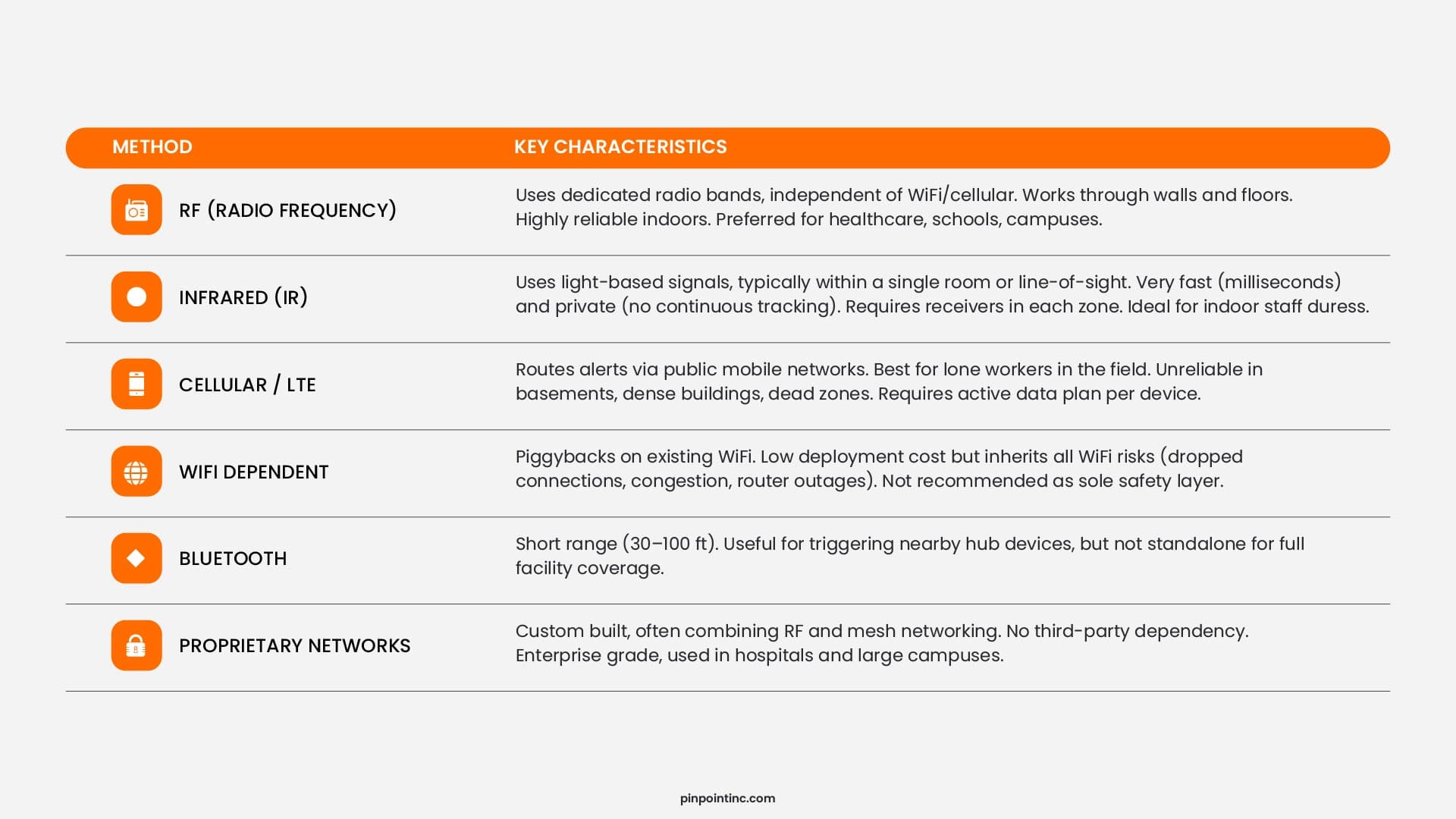
A common design error is choosing WiFi dependent systems to save money, only to find they fail in basements, stairwells, or storage areas. RF, infrared, and proprietary networks cost more but provide reliable indoor coverage where incidents often happen.
How to Choose the Right Panic Button: A Decision Framework
With four independent dimensions to navigate, the right panic button for your organization comes from answering four questions in sequence. The table below maps the most common scenarios to their optimal configuration.
Recommended Configurations by Environment
| Environment | Form Factor | Functional Type | GPS Needed? | Communication | Supervision Required? |
|---|---|---|---|---|---|
| Hospital / Healthcare | Wearable badge | Silent / Duress | No | RF / Proprietary | Yes |
| K-12 School | Wearable + fixed | Silent (law enforcement) | No | RF / Cellular | Yes |
| Hotel / Hospitality | Wearable pendant | Silent / Duress | Optional | WiFi / RF | Yes |
| Office / Corporate | Fixed under-desk | Silent or Audible | No | RF / WiFi | Recommended |
| Retail / Banking | Fixed under-desk | Silent / Duress | No | RF / Proprietary | Yes |
| Lone Workers (Field) | Wearable / App | GPS + Man-Down | Yes | Cellular / LTE | Recommended |
| Senior Care (Staff) | Wearable badge | Silent / Duress | No | RF / WiFi | Yes |
Core Principles That Apply to All Environments
Match the threat profile.
If the aggressor is already present when the button is pressed, the device must be silent. If the threat is external and deterrence matters, an audible device may be appropriate.
Never rely on WiFi as your primary communication layer for a safety critical system.
WiFi is suitable as a fallback, not a foundation. It can fail during router outages or network congestion.
Require supervision.
Any environment where staff safety is genuinely at risk deserves a system that knows in real time whether every device is operational. A panic button that might not work is worse than no panic button at all, because it creates false confidence.
GPS indoors is not a solution.
For all indoor environments (hospitals, schools, offices, hotels), choose a system built for in building location precision, not one retrofitted from an outdoor GPS product.
Get the Taxonomy Right Before You Buy
The panic button market is full of products that look similar on the surface, but the differences underneath matter, and those differences we have covered in a descriptive manner throughout this guide. We have explored form factors, industry settings, functional types, communication methods, and a decision framework to help you map any device to your specific needs.
Now, when you are ready to move from taxonomy to implementation, Pinpoint offers a system built on the principles outlined here: wearable, silent, supervised, and indoor accurate without GPS. It uses private infrared communication that works instantly, even when WiFi and cellular do not.
Next Step
See Pinpoint in Action
Now, when you are ready to move from taxonomy to implementation, Pinpoint offers a system built on the principles outlined here: wearable, silent, supervised, and indoor accurate without GPS. It uses private infrared communication that works instantly, even when WiFi and cellular do not.
Every facility has a different layout, staff count, risk profile, and response workflow. That is why an accurate estimate starts with a real conversation, not a generic price list.
See how Pinpoint performs in your actual environment.
Get a facility-specific cost breakdown.
Industry Insight
RTLS systems in healthcare are effective for tracking and operational visibility, but their real-world success depends heavily on change management, system complexity, and staff adoption – Source
Industry Insight
RTLS systems in healthcare are effective for tracking and operational visibility, but their real-world success depends heavily on change management, system complexity, and staff adoption – Source
FAQ’s
What is a panic button and how does it work?
A panic button is an emergency alert device that a person activates to signal they need immediate help. When pressed, it transmits a signal to receivers or a cloud platform, which notifies designated responders with the device’s location. In well-designed healthcare systems using infrared or RF communication, alerts are delivered in under one second.
What is the difference between a panic button and a duress button?
“Panic button” covers any device that triggers an emergency alert. “Duress button” specifically implies covert, silent activation, designed so an aggressor doesn’t know an alarm was triggered. In banking, healthcare, and security contexts, duress activation is used when signaling distress openly would increase risk.
Are panic buttons required by law in hospitals?
Several states now mandate specific staff alert systems in healthcare settings. California’s SB 553 (effective July 2024), Colorado’s SB-166, Oregon’s healthcare violence prevention law, and New Jersey’s healthcare safety mandates each carry specific requirements. The Joint Commission updated its workplace violence prevention standards in July 2025, extending accreditation requirements to in-home care. OSHA’s General Duty Clause creates an implicit expectation of protective technology in high-risk environments. Verify requirements with your state’s department of health and your accreditation body.
Which panic button type works best for healthcare settings?
Wearable, non‑GPS, supervised panic buttons. They are discreet in patient‑facing situations, do not rely on public cellular networks, and route alerts to on‑site security instead of 911. Silent duress activation is essential because an audible alarm can escalate patient aggression, which further intensifies the situation. The supervision ensures every device is always ready, so if such bad things happen, it works the way it has to be, exactly when it is needed most.
Can I use my smartphone as a panic button?
Yes, but with significant limitations. App‑based panic buttons are easy to deploy and have low upfront costs, but they depend entirely on the phone being charged, unlocked or accessible, and connected to cellular or WiFi at the moment of an incident. They also require fine motor control to navigate a touchscreen under acute stress, which can fail in a real emergency.
What are the most common causes of false panic button alarms?
False alarms typically stem from three sources: user error, poor placement, and environmental interference. Staff may accidentally press a button if training is insufficient or buttons are placed in high‑traffic areas like under desks or near workstations. Dust, humidity, vibrations, or even nearby electrical equipment can trigger wireless systems.
- What Is a Panic Button and Why Does the Type Matter?
- Dimension 1: Taxonomy by Form Factor
- Dimension 2 - Taxonomy by Industry and Setting
- Dimension 3: Taxonomy by Functional Type
- Dimension 4: Taxonomy by Communication Method
- How to Choose the Right Panic Button: A Decision Framework
- Get the Taxonomy Right Before You Buy
- FAQ’s
Author:
Jordan Belous
Chief Marketing Officer of Pinpoint North America, where she leads marketing strategy, brand development, and digital growth initiatives. She earned a Bachelor of Science in Allied Health with a concentration in physical therapy sciences from the University of Tampa, bringing a unique interdisciplinary perspective that blends healthcare knowledge with modern marketing strategy.
Jordan writes about workplace violence prevention in healthcare, nurse safety, staff wellbeing, and emerging healthcare technologies that support frontline teams. Her work explores how hospitals and behavioral health facilities can build safer environments, reduce burnout and turnover, and implement safety systems that protect staff while preserving trust and dignity.
She is also the Chief Executive Officer of Whip Pediatric Cancer, a nonprofit dedicated to supporting children battling cancer and raising awareness and funds for pediatric cancer. Through her work with Whip, Jordan regularly visits pediatric cancer patients in hospitals and spends time alongside patients, families, and the clinicians who care for them. These experiences place her directly beside nurses and healthcare teams every day and reinforce her belief that the people providing care deserve to feel just as safe as the patients they serve.
Her experiences with Whip and her work at Pinpoint are closely connected, both driven by her deep respect for nurses and frontline healthcare workers. Seeing firsthand the compassion, resilience, and critical role nurses play has strengthened her commitment to advocating for safer healthcare environments and ensuring that those who dedicate their lives to caring for others have the protection and support they deserve.